

Plutoos 302XL Multipack 2-Pack BK+CL with Chip Compatible with HP 302 36 ml for DeskJet 3630 Envy 4520 OfficeJet 3830
🖨️ 302XL 2-Pack BK+CL: 36 ml complete setWith chip · up to 1,050 pages total · for HP DeskJet 3630 Envy 4520 OfficeJet 3830✓ with chip♻️ Original HP chip💧 36 ml🖨️ up to 1,050 pages🇨🇭 Swiss warehouseThe Plutoos 302XL Multipack 2-Pack replaces the original HP 302XL cartridges — 1× Black 18 ml, 1× Tri-Colour 18 ml: 36 ml in total with a combined yield of up to 1,050 pages per ISO/IEC 24711. Every cartridge ships with its recycled original HP chip: automatic recognition and ink-level display as usual.For everyone who simply wants both ready in the HP Envy 4520: this 2-pack combines black and tri-colour — 36 ml of refilled original ink, together up to 1,050 pages. Both cartridges carry their original HP chips and sign in without detours. Calculated, that is around 5 Rappen per page. Unopened items carry the 60-day return right — and the printer's warranty stays where it is.Compatible printer models✓ HP DeskJet 1110✓ HP DeskJet 2130✓ HP DeskJet 3630✓ HP DeskJet 3636✓ HP Envy 4520✓ HP Envy 4525✓ HP OfficeJet 3830✓ HP OfficeJet 3831✓ HP OfficeJet 4650✓ HP OfficeJet 5230Note on firmware updates: These compatible cartridges are fitted with recycled original HP chips. Even so, HP attempts — by means of firmware updates — to identify chips that have already been in use and may block them. As reported by our customers and in user forums, it is better to keep automatic firmware updates switched off in the printer settings if you intend to use non-original cartridges. This decision rests entirely with you.Package contentsCartridgeColorChipVolumeYieldPlutoos 302XL (replaces F6U68AE)Black✓ with chip18 mlup to 600 pagesPlutoos 302XL (replaces F6U67AE)Tri-Colour (C+M+Y)✓ with chip18 mlup to 450 pagesTotal: 36 ml — up to 1,050 pages. Page yield per ISO/IEC 24711 (XL equivalence), 5% coverage.Installation & first useUnpack only right before installing and pull the protective strip.Insert until it clicks — the chip is recognized automatically, no resetter needed.Confirm the “non-genuine cartridge” notice with OK — this is normal.Print a nozzle check after installation.Care & storageStore sealed, upright, at 5–35 °C, away from direct sunlight — best used within 24 months.Print a few pages at least every 2–3 weeks so the nozzles do not dry out.Never leave the printer without a cartridge — the print head can dry out.Storing an opened cartridge: seal all open ports with the original protective tape, a tank tape or ordinary scotch tape, cover the contacts, store upright at room temperature.(Our advice: once opened, use the cartridge up completely rather than storing it — opened cartridges are very likely to dry out or start leaking.)Good to know“Non-genuine cartridge” message: One-time notice — confirm with OK, printing continues normally. The printer warranty remains valid.Firmware updates:The chip on this cartridge is an original HP chip recovered from used original cartridges — depending on the production batch, the cartridge itself is either a professionally remanufactured original or a newly manufactured cartridge fitted with the original chip. Recognition and ink-level display work as usual. Note, however, that HP attempts to identify already-used chips through firmware updates and may block them. As reported by our customers and in user forums: keeping automatic firmware updates switched off improves the chances of trouble-free use with non-original cartridges — and where an update has already caused a blocking message, rolling the firmware back to the previous version has helped (search: printer model + 'firmware downgrade'). Whether and how you apply this is entirely your decision and responsibility — results can vary from printer to printer.Ink level display: The chip reports levels; on some models the display may differ slightly — the actual fill volume is not affected.TroubleshootingProblemSolutionCartridge not recognizedRemove, wipe the contacts with a dry cloth, reinsert until it clicks, restart the printer.Streaks / faint printRun 1–2 nozzle cleanings from the printer menu, then a nozzle check.Wrong colorsRun print head alignment from the printer menu.Message “Cartridge not compatible” / “Ink level low” after a firmware updateRestart the printer, remove the cartridge and reinsert it until it clicks, confirm the message with OK. If the message appears immediately after a firmware update, other customers report that rolling the firmware back to the previous version has helped (Google/YouTube search: printer model + “firmware downgrade”) — the decision and its execution rest solely with the customer.✓ Free shipping (CH/FL) · ✓ Next-working-day delivery (latest the 2nd) · ✓ 60-day returns (unopened) · ✓ 14-day returns (opened, fees apply) · ✓ TWINT, PostFinance, Visa, Mastercard, invoice · ✓ Eco-friendly packagingFAQ❓ Does a compatible cartridge void my printer warranty?No. Under Swiss and EU law the warranty remains valid unless the cartridge demonstrably caused the defect.❓ Does the ink level display work?Yes — the cartridge ships with chip; the printer shows levels as usual. No chip swap, no resetter.❓ Is print quality the same as the original?Yes — pigment ink matched to HP Thermal Inkjet, produced to ISO 9001 standards.❓ My printer suddenly reports an error after an update — is the cartridge defective?No, as a rule it is not. Printer manufacturers occasionally release firmware updates that identify and restrict compatible cartridges — the cartridge itself remains fully functional. Many customers report that rolling the firmware back to the previous version helps (Google/YouTube search: printer model + “firmware downgrade”) and that compatible cartridges work most reliably when automatic updates remain switched off in the printer settings. Whether and how you apply this is solely your decision and responsibility.❓ How fast is delivery?Ordered before 5 p.m. and in stock: your order leaves our Swiss warehouse the same working day — delivered mostly the next working day, latest the 2nd. Free shipping across Switzerland and Liechtenstein. Live stock and the expected delivery date are shown at the top next to the add-to-cart button — if out of stock, we deliver as soon as possible, usually within 15 days.
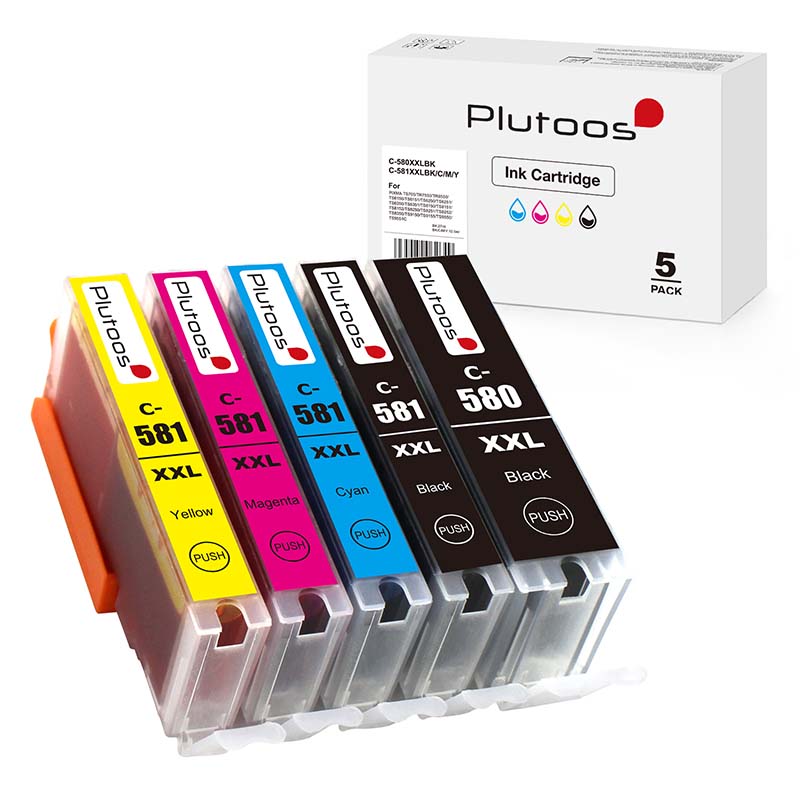
Plutoos PGI-580XXL CLI-581XXL Multipack 5-Pack BK+PBK+C+M+Y Compatible with Canon PGI580 + CLI581 72.5 ml total
Plutoos PGI-580XXL CLI-581XXL Multipack 5-Pack Compatible with Canon PGI-580XXL BK + CLI-581XXL PBK+C+M+Y 72.5 ml total The Plutoos PGI-580XXL CLI-581XXL is a compatible ink cartridge multipack for the original Canon PGI-580XXL CLI-581XXL ink cartridges — a cost-effective alternative for anyone looking to reduce printing costs without compromising on quality. With pigment-based ink, the Plutoos PGI-580XXL CLI-581XXL delivers sharp text, clean lines and crisp documents — ideal for everyday printing at home, in the home-office, at school or in small offices. Same business-day shipping from Swiss stock with free delivery and next-day arrival when in stock. The Plutoos PGI-580XXL CLI-581XXL is engineered specifically for Canon MP500, iP4500, MX850, Pro9000 — all popular Canon models widely used in Swiss households and small offices. The cartridge handles text documents, school papers, invoices and general office prints with reliable consistency. 24 Canon printer models are confirmed compatible in total — see the full list below. Compared to the original Canon PGI-580XXL CLI-581XXL, the Plutoos alternative offers the same print quality at a significantly lower price, with Swiss quality control, fast delivery and a 60-day return policy on unopened items. Package Contents 1 × Plutoos PGI-580XXL PGBK Pigment Black (Canon 1970C001), 25.7 ml, ~600 pages 1 × Plutoos CLI-581XXL BK Black (Canon 1998C001), 11.7 ml, ~4,590 photos 1 × Plutoos CLI-581XXL C Cyan (Canon 1995C001), 11.7 ml, ~825 pages 1 × Plutoos CLI-581XXL M Magenta (Canon 1996C001), 11.7 ml, ~770 pages 1 × Plutoos CLI-581XXL Y Yellow (Canon 1997C001), 11.7 ml, ~830 pages Total: 72.5 ml Why Choose the Plutoos PGI-580XXL CLI-581XXL? Compatible replacement for the original Canon PGI-580XXL CLI-581XXL — same print quality, significantly lower price Complete compatible ink cartridge set for black and colour prints Tested compatibility with 24 Canon printer models including MP500, iP4500, MX850, Pro9000 Direct Plutoos replacement — install and print, no tools required Same business-day dispatch from our Swiss warehouse Practical for everyday printing at home, school, home-office and small offices 60-day return policy on unopened items for peace of mind Technical Data Product type: Compatible multipack Compatible with: Canon PGI-5 / CLI-8 family Printer technology: Canon PGI/CLI EAN: 0647056886235 Compatible Printer Models The Plutoos is compatible with a wide range of Canon printers — from home and home-office models such as Canon PIXMA iP3300 to professional models like Canon PIXMA Pro9000. The full list of confirmed compatible printers: Canon PIXMA iP3300, Canon PIXMA iP3500, Canon PIXMA iP4200, Canon PIXMA iP4300, Canon PIXMA iP4500, Canon PIXMA iP5200, Canon PIXMA iP5300, Canon PIXMA iX4000, Canon PIXMA iX5000, Canon PIXMA MP500, Canon PIXMA MP510, Canon PIXMA MP520, Canon PIXMA MP530, Canon PIXMA MP600, Canon PIXMA MP610, Canon PIXMA MP800, Canon PIXMA MP810, Canon PIXMA MP830, Canon PIXMA MP950, Canon PIXMA MP960, Canon PIXMA MP970, Canon PIXMA MX700, Canon PIXMA MX850, Canon PIXMA Pro9000 Shipping & Returns Free shipping for all orders Next working day delivery when the item is in stock (stock and delivery date shown in the Add to Cart section above) 60-day return policy for unopened items 14-day return policy for opened items (fees apply) Secure payments via PostFinance Payment Gateway, TWINT, Mastercard, Visa, Google Pay and PostFinance Pay Eco-friendly packaging Frequently Asked Questions about the Plutoos PGI-580XXL CLI-581XXL 1. Is the Plutoos PGI-580XXL CLI-581XXL compatible with all Canon printers?Yes. The Plutoos PGI-580XXL CLI-581XXL is officially compatible with Canon MP500, iP4500, MX850, Pro9000 and 19 more printer models — see the full list above. 2. How many pages does a Plutoos PGI-580XXL CLI-581XXL print?Page yield matches the original Canon PGI-580XXL CLI-581XXL under ISO/IEC standard conditions. 3. Are the Plutoos PGI-580XXL CLI-581XXL cartridges original Canon or compatible?These are compatible ink cartridges — a tested, cost-effective alternative to the original Canon PGI-580XXL CLI-581XXL. Print quality and yield match the original. 4. How fast is delivery in Switzerland?Yes, next working day delivery if the item is in stock. The current stock availability and expected delivery date are shown directly near the 'Add to Cart' button at the top of this page. Free shipping for all orders. 5. Will using the Plutoos PGI-580XXL CLI-581XXL void my Canon printer warranty?No. Under EU and Swiss consumer law, the use of compatible ink cartridges cannot void a printer's warranty unless the cartridge is proven to have caused damage to the printer. That said, Plutoos does not assume responsibility for any printer-side issues — the use of compatible cartridges is at the customer's own discretion and responsibility.

Plutoos 303XL Multipack 2-Pack BK+CL with Chip Compatible with HP 303 36 ml for Envy Photo 6230 7130 7830
🖨️ 303XL 2-Pack BK+CL: 36 ml complete setWith chip · up to 1,050 pages total · for HP Envy Photo 6230 7130 7830✓ with chip♻️ Original HP chip💧 36 ml🖨️ up to 1,050 pages🇨🇭 Swiss warehouseThe Plutoos 303XL Multipack 2-Pack replaces the original HP 303XL cartridges — 1× Black 18 ml, 1× Tri-Colour 18 ml: 36 ml in total with a combined yield of up to 1,050 pages per ISO/IEC 24711. Every cartridge ships with its recycled original HP chip: automatic recognition and ink-level display as usual.So the HP Envy Photo 6230 never has to choose between text and photo, both cartridges arrive together here: black plus tri-colour, 36 ml, jointly up to 1,050 pages. Both are remanufactured originals with their original HP chips. Across the set, that is around 6 Rappen per page. Two cartridges in their second life — ordered in one click, on invoice if you prefer.Compatible printer models✓ HP Envy Photo 6220✓ HP Envy Photo 6230✓ HP Envy Photo 6232✓ HP Envy Photo 7130✓ HP Envy Photo 7134✓ HP Envy Photo 7830✓ HP Tango✓ HP Tango XNote on firmware updates: These compatible cartridges are fitted with recycled original HP chips. Even so, HP attempts — by means of firmware updates — to identify chips that have already been in use and may block them. As reported by our customers and in user forums, it is better to keep automatic firmware updates switched off in the printer settings if you intend to use non-original cartridges. This decision rests entirely with you.Package contentsCartridgeColorChipVolumeYieldPlutoos 303XL (replaces T6N04AE)Black✓ with chip18 mlup to 600 pagesPlutoos 303XL (replaces T6N03AE)Tri-Colour (C+M+Y)✓ with chip18 mlup to 450 pagesTotal: 36 ml — up to 1,050 pages. Page yield per ISO/IEC 24711 (XL equivalence), 5% coverage.Installation & first useUnpack only right before installing and pull the protective strip.Insert until it clicks — the chip is recognized automatically, no resetter needed.Confirm the “non-genuine cartridge” notice with OK — this is normal.Print a nozzle check after installation.Care & storageStore sealed, upright, at 5–35 °C, away from direct sunlight — best used within 24 months.Print a few pages at least every 2–3 weeks so the nozzles do not dry out.Never leave the printer without a cartridge — the print head can dry out.Storing an opened cartridge: seal all open ports with the original protective tape, a tank tape or ordinary scotch tape, cover the contacts, store upright at room temperature.(Our advice: once opened, use the cartridge up completely rather than storing it — opened cartridges are very likely to dry out or start leaking.)Good to know“Non-genuine cartridge” message: One-time notice — confirm with OK, printing continues normally. The printer warranty remains valid.Firmware updates:The chip on this cartridge is an original HP chip recovered from used original cartridges — depending on the production batch, the cartridge itself is either a professionally remanufactured original or a newly manufactured cartridge fitted with the original chip. Recognition and ink-level display work as usual. Note, however, that HP attempts to identify already-used chips through firmware updates and may block them. As reported by our customers and in user forums: keeping automatic firmware updates switched off improves the chances of trouble-free use with non-original cartridges — and where an update has already caused a blocking message, rolling the firmware back to the previous version has helped (search: printer model + 'firmware downgrade'). Whether and how you apply this is entirely your decision and responsibility — results can vary from printer to printer.Ink level display: The chip reports levels; on some models the display may differ slightly — the actual fill volume is not affected.TroubleshootingProblemSolutionCartridge not recognizedRemove, wipe the contacts with a dry cloth, reinsert until it clicks, restart the printer.Streaks / faint printRun 1–2 nozzle cleanings from the printer menu, then a nozzle check.Wrong colorsRun print head alignment from the printer menu.Message “Cartridge not compatible” / “Ink level low” after a firmware updateRestart the printer, remove the cartridge and reinsert it until it clicks, confirm the message with OK. If the message appears immediately after a firmware update, other customers report that rolling the firmware back to the previous version has helped (Google/YouTube search: printer model + “firmware downgrade”) — the decision and its execution rest solely with the customer.✓ Free shipping (CH/FL) · ✓ Next-working-day delivery (latest the 2nd) · ✓ 60-day returns (unopened) · ✓ 14-day returns (opened, fees apply) · ✓ TWINT, PostFinance, Visa, Mastercard, invoice · ✓ Eco-friendly packagingFAQ❓ Does a compatible cartridge void my printer warranty?No. Under Swiss and EU law the warranty remains valid unless the cartridge demonstrably caused the defect.❓ Does the ink level display work?Yes — the cartridge ships with chip; the printer shows levels as usual. No chip swap, no resetter.❓ Is print quality the same as the original?Yes — pigment ink matched to HP Thermal Inkjet, produced to ISO 9001 standards.❓ My printer suddenly reports an error after an update — is the cartridge defective?No, as a rule it is not. Printer manufacturers occasionally release firmware updates that identify and restrict compatible cartridges — the cartridge itself remains fully functional. Many customers report that rolling the firmware back to the previous version helps (Google/YouTube search: printer model + “firmware downgrade”) and that compatible cartridges work most reliably when automatic updates remain switched off in the printer settings. Whether and how you apply this is solely your decision and responsibility.❓ How fast is delivery?Ordered before 5 p.m. and in stock: your order leaves our Swiss warehouse the same working day — delivered mostly the next working day, latest the 2nd. Free shipping across Switzerland and Liechtenstein. Live stock and the expected delivery date are shown at the top next to the add-to-cart button — if out of stock, we deliver as soon as possible, usually within 15 days.
Content: 950 Seiten (CHF 6.73 / 100 Seiten)

Plutoos 912XL Multipack 4-Pack BK+C+M+Y with Chip Compatible with HP 912 84 ml for OfficeJet 8012 8015 & Pro 8022 8025
🖨️ 912XL multipack: 84 ml of ink — far more than the original setWith chip · replaces HP 912XL multipack 3YP34AE · up to 3,300 pages · for OfficeJet 8010–8018 & Pro 8020–8035✓ with chip 💧 84 ml total 🖨️ ISO/IEC 24711 🇨🇭 Swiss warehouseThe Plutoos 912XL multipack replaces the original HP 912XL set (3YP34AE) with all four colors — 84 ml total: 45 ml black plus 13 ml each cyan, magenta, yellow — considerably more ink than the originals. All four cartridges ship with chip: automatic recognition and ink-level display as usual.Total yield up to 3,300 pages per ISO/IEC 24711 (up to 825 pages per cartridge). Same-working-day dispatch from our Swiss warehouse.Compatible printer models✓ HP OfficeJet 8010✓ HP OfficeJet 8012✓ HP OfficeJet 8013✓ HP OfficeJet 8014✓ HP OfficeJet 8015✓ HP OfficeJet 8017✓ HP OfficeJet 8018✓ HP OfficeJet Pro 8020✓ HP OfficeJet Pro 8022✓ HP OfficeJet Pro 8023✓ HP OfficeJet Pro 8024✓ HP OfficeJet Pro 8025✓ HP OfficeJet Pro 8026✓ HP OfficeJet Pro 8028✓ HP OfficeJet Pro 8035including e-variants* (*only if HP+ / HP Instant Ink is NOT activated).A front-desk printer has earned no downtime: this 4-pack supplies the HP OfficeJet 8015 with all four colours — 84 ml of ink, together up to 3,300 pages. Across the set, that is around 2 Rappen per page, a number fit for the budget sheet. Four chips, each recognized in seconds; the manufacturer's warranty stands. For companies, the simplest bulk order — on invoice if preferred.⚠️ Important for HP “e” models (8012e, 8015e, 8022e, 8025e etc.): Compatible cartridges work only if HP+ / HP Instant Ink is NOT activated. With HP+ or an active Instant Ink subscription the printer accepts original HP cartridges only — Plutoos cartridges will then not be recognized. This is an HP restriction, not a cartridge defect; HP+ cannot be deactivated once activated. If unsure, check in the HP Smart app whether HP+ / Instant Ink is active before ordering.Note on firmware updates: HP lists these printer series as 'Dynamic Security' models — manufacturer updates can detect and restrict cartridges with non-original chips, typically showing messages such as 'Non-HP Chip Detected' or 'Cartridge Problem'. Many customers and user forums report that compatible cartridges work reliably when automatic firmware updates remain switched off in the printer settings, and that rolling back an already-installed update has helped (search: printer model + 'firmware downgrade'). The decision rests solely with the customer. Newer printer firmware can restrict the recognition of compatible (non-original) cartridges. If you intend to use compatible cartridges, we recommend disabling automatic firmware updates and installing updates manually only when needed. All information without guarantee; the decision rests with the customer.Package contentsPlutoos 912XL (replaces 3YL84AE)Black✓ with chip45 mlup to 825 pagesPlutoos 912XL (replaces 3YL81AE)Cyan✓ with chip13 mlup to 825 pagesPlutoos 912XL (replaces 3YL82AE)Magenta✓ with chip13 mlup to 825 pagesPlutoos 912XL (replaces 3YL83AE)Yellow✓ with chip13 mlup to 825 pagesTotal84 ml~3,300 pagesPage yield per ISO/IEC 24711 (XL equivalence), 5% coverage. Original single references: 3YL84AE, 3YL81AE, 3YL82AE, 3YL83AE.Installation & first useUnpack only right before installing and pull the protective strip.Insert until it clicks — the chip is recognized automatically, no resetter needed.Confirm the “non-genuine cartridge” notice with OK — this is normal.Print a nozzle check after installation.Care & storageStore sealed, upright, at 5–35 °C, away from direct sunlight — best used within 24 months.Print a few pages at least every 2–3 weeks so the nozzles do not dry out.Never leave the printer without a cartridge in the slot — the print head can dry out.Storing an opened cartridge: seal all open ports (nozzle outlet and air vent) with the original protective tape, a tank tape or ordinary scotch tape, cover the contacts, store upright at room temperature.(Our advice: once opened, use the cartridge up completely rather than storing it — opened cartridges are very likely to dry out or start leaking.)Good to know“Non-genuine cartridge” message: One-time notice with compatible cartridges — confirm with OK, printing continues normally. The printer warranty remains valid.Firmware updates:These printer series are HP 'Dynamic Security' models. Printer manufacturers occasionally release updates that restrict the recognition of non-original cartridges — as a rule, only the latest firmware versions are able to identify and block compatible cartridges. Many customers and user forums report that those who want to use compatible cartridges improve their chances of trouble-free operation when automatic firmware updates remain switched off in the printer settings. If an update has already been installed and messages such as “Cartridge not compatible” or “Ink level low” appear, other customers report that rolling the firmware back to the previous version has helped — instructions can be found via a Google/YouTube search for your printer model and “firmware downgrade”. We pass on these experiences of other customers in good faith; whether and how you apply them is solely your decision and responsibility — results may vary from printer to printer.Ink level display: The chip reports levels; on some models the display may differ slightly — the actual fill volume is not affected.TroubleshootingCartridge not recognizedRemove, wipe the contacts with a dry cloth, reinsert until it clicks, restart the printer. On e-models: check whether HP+ / Instant Ink is active.Streaks / faint printRun 1–2 nozzle cleanings from the printer menu, then a nozzle check.Wrong colorsRun print head alignment from the printer menu.Message “Cartridge not compatible” / “Ink level low” after a firmware updateRestart the printer, remove the cartridge and reinsert it until it clicks, confirm the message with OK. If the message appears immediately after a firmware update, other customers report that rolling the firmware back to the previous version has helped (Google/YouTube search: printer model + “firmware downgrade”) — the decision and its execution rest solely with the customer.✓ Free shipping (CH/FL) · ✓ Next-working-day delivery (latest the 2nd) · ✓ 60-day returns (unopened) · ✓ 14-day returns (opened, fees apply) · ✓ TWINT, PostFinance, Visa, Mastercard, invoice · ✓ Eco-friendly packagingFAQ❓ Does a compatible cartridge void my printer warranty?No. Under Swiss and EU law the warranty remains valid unless the cartridge demonstrably caused the defect.❓ Does the ink level display work?Yes — the cartridge ships with chip; the printer shows levels as usual. No chip swap, no resetter.❓ Do the cartridges work on HP “e” models (e.g. 8022e)?Yes — but only if HP+ / HP Instant Ink is not activated. With HP+ or an active Instant Ink subscription the printer accepts original HP cartridges only; an HP restriction, not a cartridge defect.❓ What is included in the set?Four cartridges with chip: black 45 ml, cyan 13 ml, magenta 13 ml, yellow 13 ml — 84 ml total, up to 3,300 pages combined.❓ My printer suddenly reports an error after an update — is the cartridge defective?No, as a rule it is not. Printer manufacturers occasionally release firmware updates that identify and restrict compatible cartridges — the cartridge itself remains fully functional. Many customers report that rolling the firmware back to the previous version helps (Google/YouTube search: printer model + “firmware downgrade”) and that compatible cartridges work most reliably when automatic updates remain switched off in the printer settings. Whether and how you apply this is solely your decision and responsibility.❓ How fast is delivery?Ordered before 5 p.m. and in stock: your order leaves our Swiss warehouse the same working day — delivered mostly the next working day, latest the 2nd. Free shipping across Switzerland and Liechtenstein. Live stock and the expected delivery date are shown at the top next to the add-to-cart button — if out of stock, we deliver as soon as possible, usually within 15 days.

Plutoos 305XL Multipack 2-Pack Compatible with HP 305 XL BK+CL 36 ml total
Plutoos 305XL Multipack 2-Pack Compatible with HP 305XL BK / 305XL CLThe Plutoos 305XL Multipack is a compatible replacement set for the original HP 305 cartridges — a cost-effective alternative for anyone looking to lower printing costs without compromising on print quality. The pack contains 2 individual cartridges with high-quality ink for everyday printing at home, home-office, school or small office.The cartridges fit perfectly in HP DeskJet 2720, DeskJet 4120, ENVY 6020, ENVY 6030 and offer a reliable alternative to expensive original cartridges. With Plutoos you benefit from same-business-day dispatch from our Swiss warehouse and a 60-day return policy on unopened items.Package Contents 1 × Plutoos 305XL Black, 18 ml · up to 600 pages · OEM ref. 3YM62AE 1 × Plutoos 305XL Tri-Color, 18 ml, up to 450 pages Total yield up to 1'050 pages per ISO/IEC 24711 (36 ml in total).Why Choose the Plutoos 305XL?Compatible replacement set for HP 305 — same quality at a much lower price2-piece multipack — all colours in one bundleHigh-quality ink for sharp, document-grade printsPerfectly compatible with DeskJet 2720, DeskJet 4120, ENVY 6020, ENVY 6030Easy install — no tools requiredSame business-day dispatch from our Swiss warehouseIdeal for home, home-office, school and small office60-day return policy on unopened itemsTechnical DataProduct type: Compatible multipack (2 cartridges)Contents: 2 individual cartridgesCompatible with the HP 305XL / 305 cartridge familyCompatible Printer ModelsThe Plutoos 305XL Multipack fits a wide range of HP printers, including the DeskJet 2720, DeskJet 4120, ENVY 6020. The full model list is below.HP DeskJet 2710HP DeskJet 2710eHP DeskJet 2720HP DeskJet 2720eHP DeskJet 2721HP DeskJet 2721eHP DeskJet 2722HP DeskJet 2723HP DeskJet 2724HP DeskJet 2742eHP DeskJet 4120HP DeskJet 4120eHP DeskJet 4122HP DeskJet 4130HP DeskJet 4130eHP DeskJet 4140HP DeskJet 4172HP ENVY 6010HP ENVY 6010eHP ENVY 6020Shipping & ReturnsFree shipping on all ordersNext working day delivery when the item is in stock (stock and delivery date shown directly near the Add to Cart button above)60-day return policy for unopened items14-day return policy for opened items (fees apply)Secure payments via PostFinance Payment Gateway, TWINT, Mastercard, Visa, Google Pay and PostFinance PayEco-friendly packagingFrequently Asked Questions about the Plutoos 305XL1. Is the Plutoos 305XL compatible with all HP models?Yes, the Plutoos 305XL is compatible with many HP printers, including DeskJet 2720, DeskJet 4120, ENVY 6020, ENVY 6030.2. How many pages does each cartridge in the Plutoos 305XL Multipack print?See the Package Contents above for individual yields — each cartridge matches the original HP cartridge yield per ISO/IEC 24711.3. Are the Plutoos 305XL cartridges original HP or compatible?The Plutoos 305XL is a compatible cartridge — a cost-effective alternative to the original HP 305XL with matching print quality, produced to high quality standards.4. How fast is delivery within Switzerland?Yes, next working day delivery if the item is in stock. The current stock availability and expected delivery date are shown directly near the 'Add to Cart' button at the top of this page. Free shipping for all orders.5. Does using the Plutoos 305XL void the printer warranty?No. Under EU and Swiss consumer law, the use of compatible ink cartridges cannot void a printer's warranty unless the cartridge is proven to have caused damage to the printer. That said, Plutoos does not assume responsibility for any printer-side issues — the use of compatible cartridges is at the customer's own discretion and responsibility.

Plutoos PG-540XL + CL-541XL Multipack 2-Pack BK+Color Compatible with Canon PG-540XL + CL-541XL for PIXMA TS5150 TS5151 MG3550 MG3650 MX475 MX535
Plutoos PG-540XL CL-541XL Multipack Set Compatible with Canon PG-540XL CL-541XL The Plutoos PG-540XL CL-541XL is a compatible ink cartridge multipack for the original Canon PG-540XL CL-541XL ink cartridges — a cost-effective alternative for anyone looking to reduce printing costs without compromising on quality. With pigment-based ink, the Plutoos PG-540XL CL-541XL delivers sharp text, clean lines and crisp documents — ideal for everyday printing at home, in the home-office, at school or in small offices. Same business-day shipping from Swiss stock with free delivery and next-day arrival when in stock. The Plutoos PG-540XL CL-541XL is engineered specifically for Canon TS5151, TS5150, MG3650S, MG3550, MX475 — all popular Canon models widely used in Swiss households and small offices. The cartridge handles text documents, school papers, invoices and general office prints with reliable consistency. 37 Canon printer models are confirmed compatible in total — see the full list below. Compared to the original Canon PG-540XL CL-541XL, the Plutoos alternative offers the same print quality at a significantly lower price, with Swiss quality control, fast delivery and a 60-day return policy on unopened items. Package Contents 1 × Plutoos PG-540XL Pigment Black ink cartridge 18 ml, upto 600 pages1 × Plutoos CL-541XL Tri-Colour ink cartridge (Cyan, Magenta, Yellow) 18 ml upto 500 pages Plutoos PG-540XL CL-541 2-Pack Together 36ml upto 1100 Why Choose the Plutoos PG-540XL CL-541XL? Compatible replacement for the original Canon PG-540XL CL-541XL — same print quality, significantly lower price Complete compatible ink cartridge set for black and colour prints Tested compatibility with 37 Canon printer models including TS5151, TS5150, MG3650S, MG3550 and more listed below Direct Plutoos replacement — install and print, no tools required Same business-day dispatch from our Swiss warehouse Practical for everyday printing at home, school, home-office and small offices 60-day return policy on unopened items for peace of mind Technical Data Product type: Compatible multipack Compatible with: Canon PG-540 / PG-540XL / CL-541 / CL-541XL family Printer technology: Canon FINE EAN: 0647056891314 Compatible Printer Models The Plutoos is compatible with a wide range of Canon printers — from home and home-office models such as Canon PIXMA MG2100 to professional models like Canon PIXMA TS5151. The full list of confirmed compatible printers: Canon PIXMA MG2100 Canon PIXMA MG2140 Canon PIXMA MG2150 Canon PIXMA MG2250 Canon PIXMA MG2255 Canon PIXMA MG3140 Canon PIXMA MG3150 Canon PIXMA MG3155 Canon PIXMA MG3250 Canon PIXMA MG3255 Canon PIXMA MG3550 Canon PIXMA MG3650 Canon PIXMA MG3650S Canon PIXMA MG4140 Canon PIXMA MG4150 Canon PIXMA MG4250 Canon PIXMA MX370 Canon PIXMA MX375 Canon PIXMA MX390 Canon PIXMA MX395 Canon PIXMA MX430 Canon PIXMA MX435 Canon PIXMA MX450 Canon PIXMA MX455 Canon PIXMA MX470 Canon PIXMA MX475 Canon PIXMA MX510 Canon PIXMA MX515 Canon PIXMA MX520 Canon PIXMA MX524 Canon PIXMA MX525 Canon PIXMA MX530 Canon PIXMA MX535 Canon PIXMA TS5100 Canon PIXMA TS5140 Canon PIXMA TS5150 Canon PIXMA TS5151 Shipping & Returns Free shipping for all orders Next working day delivery when the item is in stock (stock and delivery date shown in the Add to Cart section above) 60-day return policy for unopened items 14-day return policy for opened items (fees apply) Secure payments via PostFinance Payment Gateway, TWINT, Mastercard, Visa, Google Pay and PostFinance Pay Eco-friendly packaging Frequently Asked Questions about the Plutoos PG-540XL CL-541XL 1. Is the Plutoos PG-540XL CL-541XL compatible with all Canon printers?Yes. The Plutoos PG-540XL CL-541XL is officially compatible with Canon TS5151, TS5150, MG3650S, MG3550, MX475 and 32 more printer models — see the full list above. 2. How many pages does a Plutoos PG-540XL CL-541XL print?Plutoos PG-540XL CL-541XL 2-Pack approximate content together 36ml upto 1100 pages yields — each cartridge matches the original HP cartridge yield per ISO/IEC 24711. 3. Are the Plutoos PG-540XL CL-541XL cartridges original Canon or compatible?These are compatible ink cartridges — a tested, cost-effective alternative to the original Canon PG-540XL CL-541XL. Print quality and yield match the original. 4. How fast is delivery in Switzerland?Yes, next working day delivery if the item is in stock. The current stock availability and expected delivery date are shown directly near the 'Add to Cart' button at the top of this page. Free shipping for all orders. 5. Will using the Plutoos PG-540XL CL-541XL void my Canon printer warranty?No. Under EU and Swiss consumer law, the use of compatible ink cartridges cannot void a printer's warranty unless the cartridge is proven to have caused damage to the printer. That said, Plutoos does not assume responsibility for any printer-side issues — the use of compatible cartridges is at the customer's own discretion and responsibility.

Plutoos 302XL Black Ink Cartridge with Chip Compatible with HP 302 18 ml for DeskJet 3630 Envy 4520 OfficeJet 3830
🖨️ 302XL Black: 18 ml — up to 600 pagesWith chip · replaces HP F6U68AE · up to 600 pages · for HP DeskJet 3630 Envy 4520 OfficeJet 3830✓ with chip♻️ Original HP chip💧 18 ml🖨️ up to 600 pages🇨🇭 Swiss warehouseThe Plutoos 302XL Black is a compatible cartridge fitted with a recycled original HP chip, replacing the original HP 302XL (OEM reference F6U68AE) — with 18 ml significantly more ink than the original (8.5 ml) and a yield of up to 600 pages per ISO/IEC 24711. Ships with its recycled original HP chip: automatic recognition and ink-level display as usual.The HP OfficeJet 3830 in the hallway office quietly prints its lists every week — until the black ends, usually unannounced. This remanufactured original cartridge refills 18 ml where the original holds 8.5 ml, managing up to 600 pages. That makes around 4 Rappen per page. Its original HP chip is recognized immediately, the manufacturer's warranty stands — and unopened, we take it back for 60 days.Compatible printer models✓ HP DeskJet 1110✓ HP DeskJet 2130✓ HP DeskJet 3630✓ HP DeskJet 3636✓ HP Envy 4520✓ HP Envy 4525✓ HP OfficeJet 3830✓ HP OfficeJet 3831✓ HP OfficeJet 4650✓ HP OfficeJet 5230Note on firmware updates: These compatible cartridges are fitted with recycled original HP chips. Even so, HP attempts — by means of firmware updates — to identify chips that have already been in use and may block them. As reported by our customers and in user forums, it is better to keep automatic firmware updates switched off in the printer settings if you intend to use non-original cartridges. This decision rests entirely with you.Package contentsCartridgeColorChipVolumeYieldPlutoos 302XL (replaces F6U68AE)Black✓ with chip18 mlup to 600 pagesPage yield per ISO/IEC 24711 (XL equivalence), 5% coverage.Installation & first useUnpack only right before installing and pull the protective strip.Insert until it clicks — the chip is recognized automatically, no resetter needed.Confirm the “non-genuine cartridge” notice with OK — this is normal.Print a nozzle check after installation.Care & storageStore sealed, upright, at 5–35 °C, away from direct sunlight — best used within 24 months.Print a few pages at least every 2–3 weeks so the nozzles do not dry out.Never leave the printer without a cartridge — the print head can dry out.Storing an opened cartridge: seal all open ports with the original protective tape, a tank tape or ordinary scotch tape, cover the contacts, store upright at room temperature.(Our advice: once opened, use the cartridge up completely rather than storing it — opened cartridges are very likely to dry out or start leaking.)Good to know“Non-genuine cartridge” message: One-time notice — confirm with OK, printing continues normally. The printer warranty remains valid.Firmware updates:The chip on this cartridge is an original HP chip recovered from used original cartridges — depending on the production batch, the cartridge itself is either a professionally remanufactured original or a newly manufactured cartridge fitted with the original chip. Recognition and ink-level display work as usual. Note, however, that HP attempts to identify already-used chips through firmware updates and may block them. As reported by our customers and in user forums: keeping automatic firmware updates switched off improves the chances of trouble-free use with non-original cartridges — and where an update has already caused a blocking message, rolling the firmware back to the previous version has helped (search: printer model + 'firmware downgrade'). Whether and how you apply this is entirely your decision and responsibility — results can vary from printer to printer.Ink level display: The chip reports levels; on some models the display may differ slightly — the actual fill volume is not affected.TroubleshootingProblemSolutionCartridge not recognizedRemove, wipe the contacts with a dry cloth, reinsert until it clicks, restart the printer.Streaks / faint printRun 1–2 nozzle cleanings from the printer menu, then a nozzle check.Wrong colorsRun print head alignment from the printer menu.Message “Cartridge not compatible” / “Ink level low” after a firmware updateRestart the printer, remove the cartridge and reinsert it until it clicks, confirm the message with OK. If the message appears immediately after a firmware update, other customers report that rolling the firmware back to the previous version has helped (Google/YouTube search: printer model + “firmware downgrade”) — the decision and its execution rest solely with the customer.✓ Free shipping (CH/FL) · ✓ Next-working-day delivery (latest the 2nd) · ✓ 60-day returns (unopened) · ✓ 14-day returns (opened, fees apply) · ✓ TWINT, PostFinance, Visa, Mastercard, invoice · ✓ Eco-friendly packagingFAQ❓ Does a compatible cartridge void my printer warranty?No. Under Swiss and EU law the warranty remains valid unless the cartridge demonstrably caused the defect.❓ Does the ink level display work?Yes — the cartridge ships with chip; the printer shows levels as usual. No chip swap, no resetter.❓ Is print quality the same as the original?Yes — pigment ink matched to HP Thermal Inkjet, produced to ISO 9001 standards.❓ My printer suddenly reports an error after an update — is the cartridge defective?No, as a rule it is not. Printer manufacturers occasionally release firmware updates that identify and restrict compatible cartridges — the cartridge itself remains fully functional. Many customers report that rolling the firmware back to the previous version helps (Google/YouTube search: printer model + “firmware downgrade”) and that compatible cartridges work most reliably when automatic updates remain switched off in the printer settings. Whether and how you apply this is solely your decision and responsibility.❓ How fast is delivery?Ordered before 5 p.m. and in stock: your order leaves our Swiss warehouse the same working day — delivered mostly the next working day, latest the 2nd. Free shipping across Switzerland and Liechtenstein. Live stock and the expected delivery date are shown at the top next to the add-to-cart button — if out of stock, we deliver as soon as possible, usually within 15 days.

Plutoos 963XL Multipack 4-Pack BK+C+M+Y with Chip Compatible with HP 963 128 ml for OfficeJet Pro 9010 9015 9020
🖨️ 963XL 4-Pack: 128 ml — far more ink than the original setWith chip · replaces HP 963XL Multipack 3YP35AE · up to 6,800 pages total✓ with chip 💧 128 ml total 🖨️ up to 6,800 pages 🇨🇭 Swiss warehouseThe Plutoos 963XL set contains all colors with chip — 128 ml total, far more than the originals. Automatic recognition and ink-level display as usual.Total yield up to 6,800 pages per ISO/IEC 24711. Same-working-day dispatch from our Swiss warehouse.Compatible printer models✓ HP OfficeJet Pro 9010✓ HP OfficeJet Pro 9012✓ HP OfficeJet Pro 9013✓ HP OfficeJet Pro 9014✓ HP OfficeJet Pro 9015✓ HP OfficeJet Pro 9016✓ HP OfficeJet Pro 9018✓ HP OfficeJet Pro 9019✓ HP OfficeJet Pro 9020✓ HP OfficeJet Pro 9022✓ HP OfficeJet Pro 9023✓ HP OfficeJet Pro 9025✓ HP OfficeJet Pro 9028including e-variants* (*only if HP+ / HP Instant Ink is NOT activated).Four colours, one box, one quiet quarter: this set fully stocks the HP OfficeJet Pro 9015 — 128 ml of ink, together up to 6,800 pages. The office prints for around one Rappen per page, cleanly calculated across all colours. All four chips are recognized in seconds, and the manufacturer's warranty stands. For a small business, the short answer to long printing-cost debates — available on invoice, too.⚠️ Important for HP “e” models (9010e, 9015e, 9019e, 9022e, 9025e etc.): Compatible cartridges work only if HP+ / HP Instant Ink is NOT activated. With HP+ or an active Instant Ink subscription the printer accepts original HP cartridges only — Plutoos cartridges will then not be recognized. An HP restriction, not a cartridge defect; HP+ cannot be deactivated once activated. If unsure, check the HP Smart app before ordering.Note on firmware updates: HP lists these printer series as 'Dynamic Security' models — manufacturer updates can detect and restrict cartridges with non-original chips, typically showing messages such as 'Non-HP Chip Detected' or 'Cartridge Problem'. Many customers and user forums report that compatible cartridges work reliably when automatic firmware updates remain switched off in the printer settings, and that rolling back an already-installed update has helped (search: printer model + 'firmware downgrade'). The decision rests solely with the customer. Newer printer firmware can restrict the recognition of compatible (non-original) cartridges. If you intend to use compatible cartridges, we recommend disabling automatic firmware updates and installing updates manually only when needed. All information without guarantee; the decision rests with the customer.Package contentsPlutoos 963XL (replaces 3JA30AE)Black✓ with chip50 mlup to 2,000 pagesPlutoos 963XL (replaces 3JA27AE)Cyan✓ with chip26 mlup to 1,600 pagesPlutoos 963XL (replaces 3JA28AE)Magenta✓ with chip26 mlup to 1,600 pagesPlutoos 963XL (replaces 3JA29AE)Yellow✓ with chip26 mlup to 1,600 pagesTotal128 ml~6,800 pagesPage yield per ISO/IEC 24711 (XL equivalence), 5% coverage.Installation & first useUnpack only right before installing and pull the protective strip.Insert until it clicks — the chip is recognized automatically, no resetter needed.Confirm the “non-genuine cartridge” notice with OK — this is normal.Print a nozzle check after installation.Care & storageStore sealed, upright, at 5–35 °C, away from direct sunlight — best used within 24 months.Print a few pages at least every 2–3 weeks so the nozzles do not dry out.Never leave the printer without a cartridge — the print head can dry out.Storing an opened cartridge: seal all open ports with the original protective tape, a tank tape or ordinary scotch tape, cover the contacts, store upright at room temperature.(Our advice: once opened, use the cartridge up completely rather than storing it — opened cartridges are very likely to dry out or start leaking.)Good to know“Non-genuine cartridge” message: One-time notice — confirm with OK, printing continues normally. The printer warranty remains valid.Firmware updates:These printer series are HP 'Dynamic Security' models. Printer manufacturers occasionally release updates that restrict the recognition of non-original cartridges — as a rule, only the latest firmware versions are able to identify and block compatible cartridges. Many customers and user forums report that those who want to use compatible cartridges improve their chances of trouble-free operation when automatic firmware updates remain switched off in the printer settings. If an update has already been installed and messages such as “Cartridge not compatible” or “Ink level low” appear, other customers report that rolling the firmware back to the previous version has helped — instructions can be found via a Google/YouTube search for your printer model and “firmware downgrade”. We pass on these experiences of other customers in good faith; whether and how you apply them is solely your decision and responsibility — results may vary from printer to printer.Ink level display: The chip reports levels; on some models the display may differ slightly — the actual fill volume is not affected.TroubleshootingCartridge not recognizedRemove, wipe the contacts with a dry cloth, reinsert until it clicks, restart the printer. On e-models: check whether HP+ / Instant Ink is active.Streaks / faint printRun 1–2 nozzle cleanings from the printer menu, then a nozzle check.Wrong colorsRun print head alignment from the printer menu.Message “Cartridge not compatible” / “Ink level low” after a firmware updateRestart the printer, remove the cartridge and reinsert it until it clicks, confirm the message with OK. If the message appears immediately after a firmware update, other customers report that rolling the firmware back to the previous version has helped (Google/YouTube search: printer model + “firmware downgrade”) — the decision and its execution rest solely with the customer.✓ Free shipping (CH/FL) · ✓ Next-working-day delivery (latest the 2nd) · ✓ 60-day returns (unopened) · ✓ 14-day returns (opened, fees apply) · ✓ TWINT, PostFinance, Visa, Mastercard, invoice · ✓ Eco-friendly packagingFAQ❓ Does a compatible cartridge void my printer warranty?No. Under Swiss and EU law the warranty remains valid unless the cartridge demonstrably caused the defect.❓ Does the ink level display work?Yes — the cartridge ships with chip; the printer shows levels as usual. No chip swap, no resetter.❓ Is print quality the same as the original?Yes — pigment ink matched to HP Thermal Inkjet, produced to ISO 9001 standards.❓ Do the cartridges work on HP “e” models (e.g. 9015e)?Yes — but only if HP+ / HP Instant Ink is not activated. With HP+ or an active Instant Ink subscription the printer accepts original HP cartridges only; an HP restriction, not a cartridge defect.❓ What is included in the set?Four cartridges with chip — 128 ml total, up to 6,800 pages combined.❓ My printer suddenly reports an error after an update — is the cartridge defective?No, as a rule it is not. Printer manufacturers occasionally release firmware updates that identify and restrict compatible cartridges — the cartridge itself remains fully functional. Many customers report that rolling the firmware back to the previous version helps (Google/YouTube search: printer model + “firmware downgrade”) and that compatible cartridges work most reliably when automatic updates remain switched off in the printer settings. Whether and how you apply this is solely your decision and responsibility.❓ How fast is delivery?Ordered before 5 p.m. and in stock: your order leaves our Swiss warehouse the same working day — delivered mostly the next working day, latest the 2nd. Free shipping across Switzerland and Liechtenstein. Live stock and the expected delivery date are shown at the top next to the add-to-cart button — if out of stock, we deliver as soon as possible, usually within 15 days.

Plutoos PGI-580XXL Ink Cartridge Black Compatible with Canon PGI580 XXL 580PGBK XXL 25.7 ml
Plutoos PGI-580XXL Ink Cartridge Black Compatible with Canon PGI-580XXL The Plutoos PGI-580XXL is a compatible black ink cartridge for the original Canon PGI-580XXL ink cartridge — a cost-effective alternative for anyone looking to reduce printing costs without compromising on quality. With pigment-based ink, the Plutoos PGI-580XXL delivers sharp text, clean lines and crisp documents — ideal for everyday printing at home, in the home-office, at school or in small offices. Same business-day shipping from Swiss stock with free delivery and next-day arrival when in stock. The Plutoos PGI-580XXL is engineered specifically for Canon MP500, iP4500, MX850, Pro9000 — all popular Canon models widely used in Swiss households and small offices. The cartridge handles text documents, school papers, invoices and general office prints with reliable consistency. 24 Canon printer models are confirmed compatible in total — see the full list below. Compared to the original Canon PGI-580XXL, the Plutoos alternative offers the same print quality at a significantly lower price, with Swiss quality control, fast delivery and a 60-day return policy on unopened items. Package Contents 1 × Plutoos 580XXL Ink Cartridge Black 27 ml upto 600 pages. Why Choose the Plutoos PGI-580XXL? Compatible replacement for the original Canon PGI-580XXL — same print quality, significantly lower price Pigment black ink for sharp text and clean documents Page yield up to 600 pages per ISO/IEC standard Perfectly compatibility with 24 Canon printer models including MP500, iP4500, MX850, Pro9000 and more listed below Direct Plutoos replacement — install and print, no tools required Same business-day dispatch from our Swiss warehouse Practical for everyday printing at home, school, home-office and small offices 60-day return policy on unopened items for peace of mind Technical Data Product type: Compatible ink cartridge Colour: Pigment Black Volume: 25.7 ml Page yield: up to 600 pages Compatible with: Canon PGI-5 / CLI-8 family Printer technology: Canon PGI/CLI EAN: 0647056890447 Compatible Printer Models The Plutoos is compatible with a wide range of Canon printers — from home and home-office models such as Canon PIXMA iP3300 to professional models like Canon PIXMA Pro9000. The full list of confirmed compatible printers: Canon PIXMA iP3300 Canon PIXMA iP3500 Canon PIXMA iP4200 Canon PIXMA iP4300 Canon PIXMA iP4500 Canon PIXMA iP5200 Canon PIXMA iP5300 Canon PIXMA iX4000 Canon PIXMA iX5000 Canon PIXMA MP500 Canon PIXMA MP510 Canon PIXMA MP520 Canon PIXMA MP530 Canon PIXMA MP600 Canon PIXMA MP610 Canon PIXMA MP800 Canon PIXMA MP810 Canon PIXMA MP830 Canon PIXMA MP950 Canon PIXMA MP960 Canon PIXMA MP970 Canon PIXMA MX700 Canon PIXMA MX850 Canon PIXMA Pro9000 Shipping & Returns Free shipping for all orders Next working day delivery when the item is in stock (stock and delivery date shown in the Add to Cart section above) 60-day return policy for unopened items 14-day return policy for opened items (fees apply) Secure payments via PostFinance Payment Gateway, TWINT, Mastercard, Visa, Google Pay and PostFinance Pay Eco-friendly packaging Frequently Asked Questions about the Plutoos PGI-580XXL 1. Is the Plutoos PGI-580XXL compatible with all Canon printers?Yes. The Plutoos PGI-580XXL is officially compatible with Canon MP500, iP4500, MX850, Pro9000 and 19 more printer models — see the full list above. 2. How many pages does a Plutoos PGI-580XXL print?The Plutoos 580XXL Black approximate content 27ml up to 600 pages yields — each cartridge matches the original HP cartridge yield per ISO/IEC 24711. 3. Are the Plutoos PGI-580XXL cartridge original Canon or compatible?These are compatible ink cartridges — a tested, cost-effective alternative to the original Canon PGI-580XXL. Print quality and yield match the original. 4. How fast is delivery in Switzerland?Yes, next working day delivery if the item is in stock. The current stock availability and expected delivery date are shown directly near the 'Add to Cart' button at the top of this page. Free shipping for all orders. 5. Will using the Plutoos PGI-580XXL void my Canon printer warranty?No. Under EU and Swiss consumer law, the use of compatible ink cartridges cannot void a printer's warranty unless the cartridge is proven to have caused damage to the printer. That said, Plutoos does not assume responsibility for any printer-side issues — the use of compatible cartridges is at the customer's own discretion and responsibility.

Plutoos 603XL Multipack 4-Pack BK+C+M+Y with Chip Compatible with Epson 603 60.2 ml for XP-2100 XP-3100 XP-4100 WF-2830
🖨️ 603XL 4-Pack: 60.2 ml — far more ink than the original setWith chip · replaces Epson 603XL multipack T03A64 / C13T03A64010 · up to 1,550 pages total · for XP-2100–4155 & WF-2810–2870✓ with chip 💧 60.2 ml total 🖨️ up to 1,550 pages 🇨🇭 Swiss warehouseThe Plutoos 603XL set contains all colors with chip — 60.2 ml total, far more than the originals (8.9 / 4 ml per cartridge). Automatic recognition and ink-level display as usual.Total yield up to 1,550 pages per ISO/IEC 24711. Same-working-day dispatch from our Swiss warehouse.Compatible printer models✓ Epson XP-2100✓ Epson XP-2105✓ Epson XP-2150✓ Epson XP-2155✓ Epson XP-3100✓ Epson XP-3105✓ Epson XP-3150✓ Epson XP-3155✓ Epson XP-4100✓ Epson XP-4105✓ Epson XP-4150✓ Epson XP-4155✓ Epson WF-2810DWF✓ Epson WF-2820DWF✓ Epson WF-2830DWF✓ Epson WF-2835DWF✓ Epson WF-2840DWF✓ Epson WF-2850DWF✓ Epson WF-2870DWFNote on firmware updates: As a rule, only the latest firmware versions of a printer are able to identify and restrict compatible cartridges. Many customers and user forums report that compatible cartridges keep working without interruption when automatic firmware updates remain switched off in the printer settings. The decision rests solely with the customer. Newer printer firmware can restrict the recognition of compatible (non-original) cartridges. If you intend to use compatible cartridges, we recommend disabling automatic firmware updates and installing updates manually only when needed. All information without guarantee; the decision rests with the customer.Four colours at once instead of four separate emergency buys: this set resets the Epson XP-3100 completely — 60.2 ml of ink, together up to 1,550 pages. Calculated across the whole set, the family prints for around one Rappen per page. All chips are recognized in seconds, and the manufacturer's warranty stands. Unopened cartridges can come back within 60 days — ordering the set carries no risk.Package contentsPlutoos 603XL (replaces T03A14)Black✓ with chip18.2 mlup to 500 pagesPlutoos 603XL (replaces T03A24)Cyan✓ with chip14 mlup to 350 pagesPlutoos 603XL (replaces T03A34)Magenta✓ with chip14 mlup to 350 pagesPlutoos 603XL (replaces T03A44)Yellow✓ with chip14 mlup to 350 pagesTotal60.2 ml~1,550 pagesPage yield per ISO/IEC 24711 (XL equivalence), 5% coverage.Installation & first useUnpack only right before installing and pull the protective strip.Insert until it clicks — the chip is recognized automatically, no resetter needed.Confirm the “non-genuine cartridge” notice with OK — this is normal.Print a nozzle check after installation.Care & storageStore sealed, upright, at 5–35 °C, away from direct sunlight — best used within 24 months.Print a few pages at least every 2–3 weeks so the nozzles do not dry out.Never leave the printer without a cartridge — the print head can dry out.Storing an opened cartridge: seal all open ports with the original protective tape, a tank tape or ordinary scotch tape, cover the contacts, store upright at room temperature.(Our advice: once opened, use the cartridge up completely rather than storing it — opened cartridges are very likely to dry out or start leaking.)Good to know“Non-genuine cartridge” message: One-time notice — confirm with OK, printing continues normally. The printer warranty remains valid.Firmware updates:Printer manufacturers occasionally release updates that restrict the recognition of non-original cartridges — as a rule, only the latest firmware versions are able to identify and block compatible cartridges. Many customers and user forums report that those who want to use compatible cartridges improve their chances of trouble-free operation when automatic firmware updates remain switched off in the printer settings. If an update has already been installed and messages such as “Cartridge not compatible” or “Ink level low” appear, other customers report that rolling the firmware back to the previous version has helped — instructions can be found via a Google/YouTube search for your printer model and “firmware downgrade”. We pass on these experiences of other customers in good faith; whether and how you apply them is solely your decision and responsibility — results may vary from printer to printer.Ink level display: The chip reports levels; on some models the display may differ slightly — the actual fill volume is not affected.TroubleshootingCartridge not recognizedRemove, wipe the contacts with a dry cloth, reinsert until it clicks, restart the printer.Streaks / faint printRun 1–2 nozzle cleanings from the printer menu, then a nozzle check.Wrong colorsRun print head alignment from the printer menu.Message “Cartridge not compatible” / “Ink level low” after a firmware updateRestart the printer, remove the cartridge and reinsert it until it clicks, confirm the message with OK. If the message appears immediately after a firmware update, other customers report that rolling the firmware back to the previous version has helped (Google/YouTube search: printer model + “firmware downgrade”) — the decision and its execution rest solely with the customer.✓ Free shipping (CH/FL) · ✓ Next-working-day delivery (latest the 2nd) · ✓ 60-day returns (unopened) · ✓ 14-day returns (opened, fees apply) · ✓ TWINT, PostFinance, Visa, Mastercard, invoice · ✓ Eco-friendly packagingFAQ❓ Does a compatible cartridge void my printer warranty?No. Under Swiss and EU law the warranty remains valid unless the cartridge demonstrably caused the defect.❓ Does the ink level display work?Yes — the cartridge ships with chip; the printer shows levels as usual. No chip swap, no resetter.❓ Is print quality the same as the original?Yes — ink matched to Epson MicroPiezo, produced to ISO 9001 standards.❓ What is included in the set?Four cartridges with chip: black 18.2 ml, cyan 14 ml, magenta 14 ml, yellow 14 ml — 60.2 ml total, up to 1,550 pages. Replaces the original multipack T03A64.❓ My printer suddenly reports an error after an update — is the cartridge defective?No, as a rule it is not. Printer manufacturers occasionally release firmware updates that identify and restrict compatible cartridges — the cartridge itself remains fully functional. Many customers report that rolling the firmware back to the previous version helps (Google/YouTube search: printer model + “firmware downgrade”) and that compatible cartridges work most reliably when automatic updates remain switched off in the printer settings. Whether and how you apply this is solely your decision and responsibility.❓ How fast is delivery?Ordered before 5 p.m. and in stock: your order leaves our Swiss warehouse the same working day — delivered mostly the next working day, latest the 2nd. Free shipping across Switzerland and Liechtenstein. Live stock and the expected delivery date are shown at the top next to the add-to-cart button — if out of stock, we deliver as soon as possible, usually within 15 days.

Plutoos 953XL Multipack 4-Pack BK+C+M+Y with Chip Compatible with HP 953 158.5 ml for OfficeJet Pro 8710 8720 7740
🖨️ 953XL 4-Pack: 158.5 ml — far more ink than the original setWith chip · replaces HP 953XL Multipack 3HZ52AE · up to 6,800 pages total✓ with chip 💧 158.5 ml total 🖨️ up to 6,800 pages 🇨🇭 Swiss warehouseThe Plutoos 953XL set contains all colors with chip — 158.5 ml total, far more than the originals. Automatic recognition and ink-level display as usual.Total yield up to 6,800 pages per ISO/IEC 24711. Same-working-day dispatch from our Swiss warehouse.Compatible printer models✓ HP OfficeJet Pro 7720✓ HP OfficeJet Pro 7730✓ HP OfficeJet Pro 7740✓ HP OfficeJet Pro 8210✓ HP OfficeJet Pro 8218✓ HP OfficeJet Pro 8710✓ HP OfficeJet Pro 8715✓ HP OfficeJet Pro 8718✓ HP OfficeJet Pro 8719✓ HP OfficeJet Pro 8720✓ HP OfficeJet Pro 8725✓ HP OfficeJet Pro 8728✓ HP OfficeJet Pro 8730✓ HP OfficeJet Pro 8740Note on firmware updates: HP lists these printer series as 'Dynamic Security' models — manufacturer updates can detect and restrict cartridges with non-original chips, typically showing messages such as 'Non-HP Chip Detected' or 'Cartridge Problem'. Many customers and user forums report that compatible cartridges work reliably when automatic firmware updates remain switched off in the printer settings, and that rolling back an already-installed update has helped (search: printer model + 'firmware downgrade'). The decision rests solely with the customer. Newer printer firmware can restrict the recognition of compatible (non-original) cartridges. If you intend to use compatible cartridges, we recommend disabling automatic firmware updates and installing updates manually only when needed. All information without guarantee; the decision rests with the customer.When accounting, sales and reception all depend on the same HP OfficeJet Pro 8710, single-cartridge resupply becomes a full-time job. This 4-pack ends it: 158.5 ml of ink, together up to 6,800 pages. The page price falls to around one Rappen — printing costs that simply disappear in the annual accounts. Four chips, recognized at once; warranty untouched; unopened, a 60-day return right.Package contentsPlutoos 953XL (replaces L0S70AE)Black✓ with chip76 mlup to 2,000 pagesPlutoos 953XL (replaces F6U16AE)Cyan✓ with chip27.5 mlup to 1,600 pagesPlutoos 953XL (replaces F6U17AE)Magenta✓ with chip27.5 mlup to 1,600 pagesPlutoos 953XL (replaces F6U18AE)Yellow✓ with chip27.5 mlup to 1,600 pagesTotal158.5 ml~6,800 pagesPage yield per ISO/IEC 24711 (XL equivalence), 5% coverage.Installation & first useUnpack only right before installing and pull the protective strip.Insert until it clicks — the chip is recognized automatically, no resetter needed.Confirm the “non-genuine cartridge” notice with OK — this is normal.Print a nozzle check after installation.Care & storageStore sealed, upright, at 5–35 °C, away from direct sunlight — best used within 24 months.Print a few pages at least every 2–3 weeks so the nozzles do not dry out.Never leave the printer without a cartridge — the print head can dry out.Storing an opened cartridge: seal all open ports with the original protective tape, a tank tape or ordinary scotch tape, cover the contacts, store upright at room temperature.(Our advice: once opened, use the cartridge up completely rather than storing it — opened cartridges are very likely to dry out or start leaking.)Good to know“Non-genuine cartridge” message: One-time notice — confirm with OK, printing continues normally. The printer warranty remains valid.Firmware updates:These printer series are HP 'Dynamic Security' models. Printer manufacturers occasionally release updates that restrict the recognition of non-original cartridges — as a rule, only the latest firmware versions are able to identify and block compatible cartridges. Many customers and user forums report that those who want to use compatible cartridges improve their chances of trouble-free operation when automatic firmware updates remain switched off in the printer settings. If an update has already been installed and messages such as “Cartridge not compatible” or “Ink level low” appear, other customers report that rolling the firmware back to the previous version has helped — instructions can be found via a Google/YouTube search for your printer model and “firmware downgrade”. We pass on these experiences of other customers in good faith; whether and how you apply them is solely your decision and responsibility — results may vary from printer to printer.Ink level display: The chip reports levels; on some models the display may differ slightly — the actual fill volume is not affected.TroubleshootingCartridge not recognizedRemove, wipe the contacts with a dry cloth, reinsert until it clicks, restart the printer.Streaks / faint printRun 1–2 nozzle cleanings from the printer menu, then a nozzle check.Wrong colorsRun print head alignment from the printer menu.Message “Cartridge not compatible” / “Ink level low” after a firmware updateRestart the printer, remove the cartridge and reinsert it until it clicks, confirm the message with OK. If the message appears immediately after a firmware update, other customers report that rolling the firmware back to the previous version has helped (Google/YouTube search: printer model + “firmware downgrade”) — the decision and its execution rest solely with the customer.✓ Free shipping (CH/FL) · ✓ Next-working-day delivery (latest the 2nd) · ✓ 60-day returns (unopened) · ✓ 14-day returns (opened, fees apply) · ✓ TWINT, PostFinance, Visa, Mastercard, invoice · ✓ Eco-friendly packagingFAQ❓ Does a compatible cartridge void my printer warranty?No. Under Swiss and EU law the warranty remains valid unless the cartridge demonstrably caused the defect.❓ Does the ink level display work?Yes — the cartridge ships with chip; the printer shows levels as usual. No chip swap, no resetter.❓ Is print quality the same as the original?Yes — pigment ink matched to HP Thermal Inkjet, produced to ISO 9001 standards.❓ What is included in the set?Four cartridges with chip — 158.5 ml total, up to 6,800 pages combined.❓ My printer suddenly reports an error after an update — is the cartridge defective?No, as a rule it is not. Printer manufacturers occasionally release firmware updates that identify and restrict compatible cartridges — the cartridge itself remains fully functional. Many customers report that rolling the firmware back to the previous version helps (Google/YouTube search: printer model + “firmware downgrade”) and that compatible cartridges work most reliably when automatic updates remain switched off in the printer settings. Whether and how you apply this is solely your decision and responsibility.❓ How fast is delivery?Ordered before 5 p.m. and in stock: your order leaves our Swiss warehouse the same working day — delivered mostly the next working day, latest the 2nd. Free shipping across Switzerland and Liechtenstein. Live stock and the expected delivery date are shown at the top next to the add-to-cart button — if out of stock, we deliver as soon as possible, usually within 15 days.

Plutoos PG-545XL Multipack 2-Pack BK+Color Compatible with Canon PG545 XL BK + CL546 Tri-Color
Plutoos PG-545XL CL-546XL Multipack Set Compatible with Canon PG-545XL CL-546XL The Plutoos PG-545XL CL-546XL is a compatible ink cartridge multipack for the original Canon PG-545XL CL-546XL ink cartridges — a cost-effective alternative for anyone looking to reduce printing costs without compromising on quality. With pigment-based ink, the Plutoos PG-545XL CL-546XL delivers sharp text, clean lines and crisp documents — ideal for everyday printing at home, in the home-office, at school or in small offices. Same business-day shipping from Swiss stock with free delivery and next-day arrival when in stock. The Plutoos PG-545XL CL-546XL is engineered specifically for Canon TR4650, TS3450, MG3052, MX495 — all popular Canon models widely used in Swiss households and small offices. The cartridge handles text documents, school papers, invoices and general office prints with reliable consistency. 17 Canon printer models are confirmed compatible in total — see the full list below. Compared to the original Canon PG-545XL CL-546XL, the Plutoos alternative offers the same print quality at a significantly lower price, with Swiss quality control, fast delivery and a 60-day return policy on unopened items. Package Contents 1 × Plutoos PG-545XL Black (Pigment ink), 15 ml, up to 400 pages 1 × Plutoos CL-546 Tri-Colour (Cyan, Magenta, Yellow), 13 ml, up to 300 pages Why Choose the Plutoos PG-545XL CL-546XL? Compatible replacement for the original Canon PG-545XL CL-546XL — same print quality, significantly lower price Complete compatible ink cartridge set for black and colour prints Perfectly compatibility with 17 Canon printer models including TR4650, TS3450, MG3052, MX495 and more listed below Direct Plutoos replacement — install and print, no tools required Same business-day dispatch from our Swiss warehouse Practical for everyday printing at home, school, home-office and small offices 60-day return policy on unopened items for peace of mind Technical Data Product type: Compatible multipack Compatible with: Canon PG-545 / PG-545XL / CL-546 / CL-546XL family Printer technology: Canon FINE EAN: 0647056891062 Compatible Printer Models The Plutoos is compatible with a wide range of Canon printers — from home and home-office models such as Canon PIXMA iP2850 to professional models like Canon PIXMA TR4650. The full list of confirmed compatible printers: Canon PIXMA iP2850 Canon PIXMA MG2450 Canon PIXMA MG2550 Canon PIXMA MG2550S Canon PIXMA MG2950 Canon PIXMA MG3050 Canon PIXMA MG3051 Canon PIXMA MG3052 Canon PIXMA MG3053 Canon PIXMA MX495 Canon PIXMA TS205 Canon PIXMA TS305 Canon PIXMA TS3150 Canon PIXMA TS3350 Canon PIXMA TS3450 Canon PIXMA TR4550 Canon PIXMA TR4650 Shipping & Returns Free shipping for all orders Next working day delivery when the item is in stock (stock and delivery date shown in the Add to Cart section above) 60-day return policy for unopened items 14-day return policy for opened items (fees apply) Secure payments via PostFinance Payment Gateway, TWINT, Mastercard, Visa, Google Pay and PostFinance Pay Eco-friendly packaging Frequently Asked Questions about the Plutoos PG-545XL CL-546XL 1. Is the Plutoos PG-545XL CL-546XL compatible with all Canon printers?Yes. The Plutoos PG-545XL CL-546XL is officially compatible with Canon TR4650, TS3450, MG3052, MX495 and 12 more printer models — see the full list above. 2. How many pages does a Plutoos PG-545XL CL-546XL print?The Plutoos PG-545XL CL-546XL Multipack approximate content 26ml up to 670 pages yields — each cartridge matches the original HP cartridge yield per ISO/IEC 24711. 3. Are the Plutoos PG-545XL CL-546XL cartridges original Canon or compatible?These are compatible ink cartridges — a tested, cost-effective alternative to the original Canon PG-545XL CL-546XL. Print quality and yield match the original. 4. How fast is delivery in Switzerland?Yes, next working day delivery if the item is in stock. The current stock availability and expected delivery date are shown directly near the 'Add to Cart' button at the top of this page. Free shipping for all orders. 5. Will using the Plutoos PG-545XL CL-546XL void my Canon printer warranty?No. Under EU and Swiss consumer law, the use of compatible ink cartridges cannot void a printer's warranty unless the cartridge is proven to have caused damage to the printer. That said, Plutoos does not assume responsibility for any printer-side issues — the use of compatible cartridges is at the customer's own discretion and responsibility.

Plutoos 303 Black Ink Cartridge with Chip Compatible with HP 303 4 ml for Envy Photo 6230 7130 7830
🖨️ 303 Black: 4 ml — up to 200 pagesWith chip · replaces HP T6N02AE · up to 200 pages · for HP Envy Photo 6230 7130 7830✓ with chip💧 4 ml🖨️ up to 200 pages🇨🇭 Swiss warehouseThe Plutoos 303 Black is a compatible replacement for the original HP 303 (OEM reference T6N02AE) — with 4 ml and a yield of up to 200 pages per ISO/IEC 24711. Ships with chip: automatic recognition and ink-level display as usual.Photo printers are creatures of habit: the HP Envy Photo 7130 wants its exact 303 — and it should be there the moment the picture is ready. This remanufactured original cartridge brings 4 ml of black with the original HP chip and prints up to 200 pages — a small standard fill for occasional printing, honestly costed at around 14 Rappen per page, with no capital sitting idle in the cupboard. It is recognized like the original, because that is precisely what it was. Unopened items carry the 60-day return right, and your printer's warranty stays untouched.Compatible printer models✓ HP Envy Photo 6220✓ HP Envy Photo 6230✓ HP Envy Photo 6232✓ HP Envy Photo 7130✓ HP Envy Photo 7134✓ HP Envy Photo 7830✓ HP Tango✓ HP Tango XNote on firmware updates: As a rule, only the latest firmware versions of a printer are able to identify and restrict compatible cartridges. Many customers and user forums report that compatible cartridges keep working without interruption when automatic firmware updates remain switched off in the printer settings. The decision rests solely with the customer.Package contentsCartridgeColorChipVolumeYieldPlutoos 303 (replaces T6N02AE)Black✓ with chip4 mlup to 200 pagesPage yield per ISO/IEC 24711, 5% coverage.Installation & first useUnpack only right before installing and pull the protective strip.Insert until it clicks — the chip is recognized automatically, no resetter needed.Confirm the “non-genuine cartridge” notice with OK — this is normal.Print a nozzle check after installation.Care & storageStore sealed, upright, at 5–35 °C, away from direct sunlight — best used within 24 months.Print a few pages at least every 2–3 weeks so the nozzles do not dry out.Never leave the printer without a cartridge — the print head can dry out.Storing an opened cartridge: seal all open ports with the original protective tape, a tank tape or ordinary scotch tape, cover the contacts, store upright at room temperature.(Our advice: once opened, use the cartridge up completely rather than storing it — opened cartridges are very likely to dry out or start leaking.)Good to know“Non-genuine cartridge” message: One-time notice — confirm with OK, printing continues normally. The printer warranty remains valid.Firmware updates:Printer manufacturers occasionally release updates that restrict the recognition of non-original cartridges — as a rule, only the latest firmware versions are able to identify and block compatible cartridges. Many customers and user forums report that those who want to use compatible cartridges improve their chances of trouble-free operation when automatic firmware updates remain switched off in the printer settings. If an update has already been installed and messages such as “Cartridge not compatible” or “Ink level low” appear, other customers report that rolling the firmware back to the previous version has helped — instructions can be found via a Google/YouTube search for your printer model and “firmware downgrade”. We pass on these experiences of other customers in good faith; whether and how you apply them is solely your decision and responsibility — results may vary from printer to printer.Ink level display: The chip reports levels; on some models the display may differ slightly — the actual fill volume is not affected.TroubleshootingProblemSolutionCartridge not recognizedRemove, wipe the contacts with a dry cloth, reinsert until it clicks, restart the printer.Streaks / faint printRun 1–2 nozzle cleanings from the printer menu, then a nozzle check.Wrong colorsRun print head alignment from the printer menu.Message “Cartridge not compatible” / “Ink level low” after a firmware updateRestart the printer, remove the cartridge and reinsert it until it clicks, confirm the message with OK. If the message appears immediately after a firmware update, other customers report that rolling the firmware back to the previous version has helped (Google/YouTube search: printer model + “firmware downgrade”) — the decision and its execution rest solely with the customer.✓ Free shipping (CH/FL) · ✓ Next-working-day delivery (latest the 2nd) · ✓ 60-day returns (unopened) · ✓ 14-day returns (opened, fees apply) · ✓ TWINT, PostFinance, Visa, Mastercard, invoice · ✓ Eco-friendly packagingFAQ❓ Does a compatible cartridge void my printer warranty?No. Under Swiss and EU law the warranty remains valid unless the cartridge demonstrably caused the defect.❓ Does the ink level display work?Yes — the cartridge ships with chip; the printer shows levels as usual. No chip swap, no resetter.❓ Is print quality the same as the original?Yes — pigment ink matched to HP Thermal Inkjet, produced to ISO 9001 standards.❓ My printer suddenly reports an error after an update — is the cartridge defective?No, as a rule it is not. Printer manufacturers occasionally release firmware updates that identify and restrict compatible cartridges — the cartridge itself remains fully functional. Many customers report that rolling the firmware back to the previous version helps (Google/YouTube search: printer model + “firmware downgrade”) and that compatible cartridges work most reliably when automatic updates remain switched off in the printer settings. Whether and how you apply this is solely your decision and responsibility.❓ How fast is delivery?Ordered before 5 p.m. and in stock: your order leaves our Swiss warehouse the same working day — delivered mostly the next working day, latest the 2nd. Free shipping across Switzerland and Liechtenstein. Live stock and the expected delivery date are shown at the top next to the add-to-cart button — if out of stock, we deliver as soon as possible, usually within 15 days.

Plutoos PGI-580XXL CLI-581XXL Multipack 6-Pack BK+PBK+C+M+Y+PhotoBlue Compatible with Canon PGI580 + CLI581 84.2 ml total
Plutoos PGI-580XXL CLI-581XXL Multipack 6-Pack Compatible with Canon PGI-580XXL BK + CLI-581XXL PBK+C+M+Y+Photo-Blue 84.2 ml total The Plutoos PGI-580XXL CLI-581XXL is a compatible ink cartridge multipack for the original Canon PGI-580XXL CLI-581XXL ink cartridges — a cost-effective alternative for anyone looking to reduce printing costs without compromising on quality. With pigment-based ink, the Plutoos PGI-580XXL CLI-581XXL delivers sharp text, clean lines and crisp documents — ideal for everyday printing at home, in the home-office, at school or in small offices. Same business-day shipping from Swiss stock with free delivery and next-day arrival when in stock. The Plutoos PGI-580XXL CLI-581XXL is engineered specifically for Canon MP500, iP4500, MX850, Pro9000 — all popular Canon models widely used in Swiss households and small offices. The cartridge handles text documents, school papers, invoices and general office prints with reliable consistency. 24 Canon printer models are confirmed compatible in total — see the full list below. Compared to the original Canon PGI-580XXL CLI-581XXL, the Plutoos alternative offers the same print quality at a significantly lower price, with Swiss quality control, fast delivery and a 60-day return policy on unopened items. Package Contents 1 × Plutoos PGI-580XXL PGBK Pigment Black (Canon 1970C001), 25.7 ml, ~600 pages 1 × Plutoos CLI-581XXL BK Black (Canon 1998C001), 11.7 ml, ~4,590 photos 1 × Plutoos CLI-581XXL C Cyan (Canon 1995C001), 11.7 ml, ~825 pages 1 × Plutoos CLI-581XXL M Magenta (Canon 1996C001), 11.7 ml, ~770 pages 1 × Plutoos CLI-581XXL Y Yellow (Canon 1997C001), 11.7 ml, ~830 pages 1 × Plutoos CLI-581XXL PB Photo Blue (Canon 1999C001), 11.7 ml, ~6,470 photos Total: 84.2 ml Why Choose the Plutoos PGI-580XXL CLI-581XXL? Compatible replacement for the original Canon PGI-580XXL CLI-581XXL — same print quality, significantly lower price Complete compatible ink cartridge set for black and colour prints Tested compatibility with 24 Canon printer models including MP500, iP4500, MX850, Pro9000 Direct Plutoos replacement — install and print, no tools required Same business-day dispatch from our Swiss warehouse Practical for everyday printing at home, school, home-office and small offices 60-day return policy on unopened items for peace of mind Technical Data Product type: Compatible multipack Compatible with: Canon PGI-5 / CLI-8 family Printer technology: Canon PGI/CLI EAN: 0647056882473 Compatible Printer Models The Plutoos is compatible with a wide range of Canon printers — from home and home-office models such as Canon PIXMA iP3300 to professional models like Canon PIXMA Pro9000. The full list of confirmed compatible printers: Canon PIXMA iP3300, Canon PIXMA iP3500, Canon PIXMA iP4200, Canon PIXMA iP4300, Canon PIXMA iP4500, Canon PIXMA iP5200, Canon PIXMA iP5300, Canon PIXMA iX4000, Canon PIXMA iX5000, Canon PIXMA MP500, Canon PIXMA MP510, Canon PIXMA MP520, Canon PIXMA MP530, Canon PIXMA MP600, Canon PIXMA MP610, Canon PIXMA MP800, Canon PIXMA MP810, Canon PIXMA MP830, Canon PIXMA MP950, Canon PIXMA MP960, Canon PIXMA MP970, Canon PIXMA MX700, Canon PIXMA MX850, Canon PIXMA Pro9000 Shipping & Returns Free shipping for all orders Next working day delivery when the item is in stock (stock and delivery date shown in the Add to Cart section above) 60-day return policy for unopened items 14-day return policy for opened items (fees apply) Secure payments via PostFinance Payment Gateway, TWINT, Mastercard, Visa, Google Pay and PostFinance Pay Eco-friendly packaging Frequently Asked Questions about the Plutoos PGI-580XXL CLI-581XXL 1. Is the Plutoos PGI-580XXL CLI-581XXL compatible with all Canon printers?Yes. The Plutoos PGI-580XXL CLI-581XXL is officially compatible with Canon MP500, iP4500, MX850, Pro9000 and 19 more printer models — see the full list above. 2. How many pages does a Plutoos PGI-580XXL CLI-581XXL print?Page yield matches the original Canon PGI-580XXL CLI-581XXL under ISO/IEC standard conditions. 3. Are the Plutoos PGI-580XXL CLI-581XXL cartridges original Canon or compatible?These are compatible ink cartridges — a tested, cost-effective alternative to the original Canon PGI-580XXL CLI-581XXL. Print quality and yield match the original. 4. How fast is delivery in Switzerland?Yes, next working day delivery if the item is in stock. The current stock availability and expected delivery date are shown directly near the 'Add to Cart' button at the top of this page. Free shipping for all orders. 5. Will using the Plutoos PGI-580XXL CLI-581XXL void my Canon printer warranty?No. Under EU and Swiss consumer law, the use of compatible ink cartridges cannot void a printer's warranty unless the cartridge is proven to have caused damage to the printer. That said, Plutoos does not assume responsibility for any printer-side issues — the use of compatible cartridges is at the customer's own discretion and responsibility.

Plutoos 405XL Multipack 4-Pack Compatible with Epson 405 75 ml total for WF-3820DWF WF-4820DWF
Plutoos 405XL Multipack Ink Cartridges – Compatible with the Epson 405XL Cartridge 4-Pack The Plutoos 405XL Multipack is a compatible replacement set for the original Epson 405 cartridges — a cost-effective alternative for anyone looking to lower printing costs without compromising on print quality. The pack contains 4 individual cartridges with high-quality pigment ink for everyday printing. The multipack fits perfectly in Epson WorkForce Pro WF-3820DWF, WorkForce Pro WF-4820DWF, WorkForce Pro WF-7830DTWF, WorkForce Pro WF-7840DTWF and offers a reliable, cost-effective alternative to expensive original cartridges. With Plutoos you benefit from same-business-day dispatch from our Swiss warehouse and a 60-day return policy on unopened items. Package Contents 1 × Plutoos 405XL Black, 21 ml, up to 1100 pages 1 × Plutoos 405XL Cyan, 18 ml, up to 1100 pages 1 × Plutoos 405XL Magenta, 18 ml, up to 1100 pages 1 × Plutoos 405XL Yellow, 18 ml, up to 1100 pages Why Choose the Plutoos 405XL? Compatible replacement set for Epson 405 — same quality at a much lower price4-piece multipack — all colours in one bundleHigh-quality pigment ink for sharp, document-grade printsPerfectly compatible with WorkForce Pro WF-3820DWF, WorkForce Pro WF-4820DWF, WorkForce Pro WF-7830DTWF, WorkForce Pro WF-7840DTWF and more listed below. Easy install — no tools requiredSame business-day dispatch from our Swiss warehouseIdeal for home, home-office, school and small office60-day return policy on unopened items Technical Data Product type: Compatible multipack (4 cartridges)Contents: 4 individual cartridgesCompatible with the Epson 405XL / 405 cartridge familyPrint technology: Epson MicroPiezo Compatible Printer Models The Plutoos 405XL fits a wide range of Epson printers, including the WorkForce Pro WF-3820DWF, WorkForce Pro WF-4820DWF, WorkForce Pro WF-7830DTWF. The full model list is below.Epson WorkForce Pro WF-3820DWFEpson WorkForce Pro WF-3825DWFEpson WorkForce Pro WF-4820DWFEpson WorkForce Pro WF-4825DWFEpson WorkForce Pro WF-4830DTWFEpson WorkForce Pro WF-7310DTWEpson WorkForce Pro WF-7830DTWFEpson WorkForce Pro WF-7835DTWFEpson WorkForce Pro WF-7840DTWF Shipping & Returns Free shipping on all ordersNext working day delivery when the item is in stock (stock and delivery date shown directly near the Add to Cart button above)60-day return policy for unopened items14-day return policy for opened items (fees apply)Secure payments via PostFinance Payment Gateway, TWINT, Mastercard, Visa, Google Pay and PostFinance PayEco-friendly packaging Frequently Asked Questions about the Plutoos 405XL1. Is the Plutoos 405XL Multipack compatible with all Epson 405-family models?Yes, the Plutoos 405XL Multipack is compatible with many Epson printers, including WorkForce Pro WF-3820DWF, WorkForce Pro WF-4820DWF, WorkForce Pro WF-7830DTWF, WorkForce Pro WF-7840DTWF full list above. 2. How many cartridges are in the Plutoos 405XL Multipack?The Plutoos 405XL Multipack approximate content 75 ml up to 4400 pages yields — each cartridge matches the original HP cartridge yield per ISO/IEC 24711. 3. Are the Plutoos 405XL cartridges original Epson or compatible?The Plutoos 405XL is a compatible cartridge — a cost-effective alternative to the original Epson 405XL with matching print quality, produced to high quality standards.4. How fast is delivery within Switzerland?Yes, next working day delivery if the item is in stock. The current stock availability and expected delivery date are shown directly near the 'Add to Cart' button at the top of this page. Free shipping for all orders.5. Does using the Plutoos 405XL void the printer warranty?No. Under EU and Swiss consumer law, the use of compatible ink cartridges cannot void a printer's warranty unless the cartridge is proven to have caused damage to the printer. That said, Plutoos does not assume responsibility for any printer-side issues — the use of compatible cartridges is at the customer's own discretion and responsibility.

Plutoos PG-545XL Ink Cartridge Black Compatible with Canon PG545 XL 14 ml for Pixma Ip2850/Pixma MG2450/2550S
Plutoos PG-545XL Ink Cartridge Black Compatible with Canon PG-545XL 545XL 15 ml The Plutoos PG-545XL is a compatible black ink cartridge for the original Canon PG-545XL ink cartridge — a cost-effective alternative for anyone looking to reduce printing costs without compromising on quality. With pigment-based ink, the Plutoos PG-545XL delivers sharp text, clean lines and crisp documents — ideal for everyday printing at home, in the home-office, at school or in small offices. Same business-day shipping from Swiss stock with free delivery and next-day arrival when in stock. The Plutoos PG-545XL is engineered specifically for Canon TR4650, TS3450, MG3052, MX495 — all popular Canon models widely used in Swiss households and small offices. The cartridge handles text documents, school papers, invoices and general office prints with reliable consistency. 17 Canon printer models are confirmed compatible in total — see the full list below. Compared to the original Canon PG-545XL, the Plutoos alternative offers the same print quality at a significantly lower price, with Swiss quality control, fast delivery and a 60-day return policy on unopened items. Package Contents 1 x Plutoos PG-545XL Ink Cartridge, Pigment Black, 15 ml Page yield: up to 400 pages Why Choose the Plutoos PG-545XL? Compatible replacement for the original Canon PG-545XL — same print quality, significantly lower price Pigment black ink for sharp text and clean documents Page yield up to 400 pages per ISO/IEC standard Tested compatibility with 17 Canon printer models including TR4650, TS3450, MG3052, MX495 Direct Plutoos replacement — install and print, no tools required Same business-day dispatch from our Swiss warehouse Practical for everyday printing at home, school, home-office and small offices 60-day return policy on unopened items for peace of mind Technical Data Product type: Compatible ink cartridge Colour: Pigment Black Volume: 15 ml Page yield: up to 400 pages Compatible with: Canon PG-545 / PG-545XL / CL-546 / CL-546XL family Printer technology: Canon FINE EAN: 0647056889076 Compatible Printer Models The Plutoos is compatible with a wide range of Canon printers — from home and home-office models such as Canon PIXMA iP2850 to professional models like Canon PIXMA TR4650. The full list of confirmed compatible printers: Canon PIXMA iP2850, Canon PIXMA MG2450, Canon PIXMA MG2550, Canon PIXMA MG2550S, Canon PIXMA MG2950, Canon PIXMA MG3050, Canon PIXMA MG3051, Canon PIXMA MG3052, Canon PIXMA MG3053, Canon PIXMA MX495, Canon PIXMA TS205, Canon PIXMA TS305, Canon PIXMA TS3150, Canon PIXMA TS3350, Canon PIXMA TS3450, Canon PIXMA TR4550, Canon PIXMA TR4650 Shipping & Returns Free shipping for all orders Next working day delivery when the item is in stock (stock and delivery date shown in the Add to Cart section above) 60-day return policy for unopened items 14-day return policy for opened items (fees apply) Secure payments via PostFinance Payment Gateway, TWINT, Mastercard, Visa, Google Pay and PostFinance Pay Eco-friendly packaging Frequently Asked Questions about the Plutoos PG-545XL 1. Is the Plutoos PG-545XL compatible with all Canon printers?Yes. The Plutoos PG-545XL is officially compatible with Canon TR4650, TS3450, MG3052, MX495 and 12 more printer models — see the full list above. 2. How many pages does a Plutoos PG-545XL print?Up to 400 pages tested under ISO/IEC standard (5% page coverage), with 15 ml of ink. 3. Are the Plutoos PG-545XL cartridge original Canon or compatible?These are compatible ink cartridges — a tested, cost-effective alternative to the original Canon PG-545XL. Print quality and yield match the original. 4. How fast is delivery in Switzerland?Yes, next working day delivery if the item is in stock. The current stock availability and expected delivery date are shown directly near the 'Add to Cart' button at the top of this page. Free shipping for all orders. 5. Will using the Plutoos PG-545XL void my Canon printer warranty?No. Under EU and Swiss consumer law, the use of compatible ink cartridges cannot void a printer's warranty unless the cartridge is proven to have caused damage to the printer. That said, Plutoos does not assume responsibility for any printer-side issues — the use of compatible cartridges is at the customer's own discretion and responsibility.

Plutoos PG-540XL Ink Cartridge Black Compatible with Canon PG540 XL 18 ml for Pixma MG2150/Pixma MX375/Pixma TS5150
Plutoos PG-540XL Ink Cartridge Black Compatible with Canon PG-540XL 540XL 21 ml The Plutoos PG-540XL is a compatible black ink cartridge for the original Canon PG-540XL ink cartridge — a cost-effective alternative for anyone looking to reduce printing costs without compromising on quality. With pigment-based ink, the Plutoos PG-540XL delivers sharp text, clean lines and crisp documents — ideal for everyday printing at home, in the home-office, at school or in small offices. Same business-day shipping from Swiss stock with free delivery and next-day arrival when in stock. The Plutoos PG-540XL is engineered specifically for Canon TS5151, TS5150, MG3650S, MG3550, MX475 — all popular Canon models widely used in Swiss households and small offices. The cartridge handles text documents, school papers, invoices and general office prints with reliable consistency. 37 Canon printer models are confirmed compatible in total — see the full list below. Compared to the original Canon PG-540XL, the Plutoos alternative offers the same print quality at a significantly lower price, with Swiss quality control, fast delivery and a 60-day return policy on unopened items. Package Contents 1 x Plutoos PG-540XL Ink Cartridge, Pigment Black, 21 ml Page yield: up to 600 pages Why Choose the Plutoos PG-540XL? Compatible replacement for the original Canon PG-540XL — same print quality, significantly lower price Pigment black ink for sharp text and clean documents Page yield up to 600 pages per ISO/IEC standard Tested compatibility with 37 Canon printer models including TS5151, TS5150, MG3650S, MG3550 Direct Plutoos replacement — install and print, no tools required Same business-day dispatch from our Swiss warehouse Practical for everyday printing at home, school, home-office and small offices 60-day return policy on unopened items for peace of mind Technical Data Product type: Compatible ink cartridge Colour: Pigment Black Volume: 21 ml Page yield: up to 600 pages Compatible with: Canon PG-540 / PG-540XL / CL-541 / CL-541XL family Printer technology: Canon FINE EAN: 0647056892564 Compatible Printer Models The Plutoos is compatible with a wide range of Canon printers — from home and home-office models such as Canon PIXMA MG2100 to professional models like Canon PIXMA TS5151. The full list of confirmed compatible printers: Canon PIXMA MG2100, Canon PIXMA MG2140, Canon PIXMA MG2150, Canon PIXMA MG2250, Canon PIXMA MG2255, Canon PIXMA MG3140, Canon PIXMA MG3150, Canon PIXMA MG3155, Canon PIXMA MG3250, Canon PIXMA MG3255, Canon PIXMA MG3550, Canon PIXMA MG3650, Canon PIXMA MG3650S, Canon PIXMA MG4140, Canon PIXMA MG4150, Canon PIXMA MG4250, Canon PIXMA MX370, Canon PIXMA MX375, Canon PIXMA MX390, Canon PIXMA MX395, Canon PIXMA MX430, Canon PIXMA MX435, Canon PIXMA MX450, Canon PIXMA MX455, Canon PIXMA MX470, Canon PIXMA MX475, Canon PIXMA MX510, Canon PIXMA MX515, Canon PIXMA MX520, Canon PIXMA MX524, Canon PIXMA MX525, Canon PIXMA MX530, Canon PIXMA MX535, Canon PIXMA TS5100, Canon PIXMA TS5140, Canon PIXMA TS5150, Canon PIXMA TS5151 Shipping & Returns Free shipping for all orders Next working day delivery when the item is in stock (stock and delivery date shown in the Add to Cart section above) 60-day return policy for unopened items 14-day return policy for opened items (fees apply) Secure payments via PostFinance Payment Gateway, TWINT, Mastercard, Visa, Google Pay and PostFinance Pay Eco-friendly packaging Frequently Asked Questions about the Plutoos PG-540XL 1. Is the Plutoos PG-540XL compatible with all Canon printers?Yes. The Plutoos PG-540XL is officially compatible with Canon TS5151, TS5150, MG3650S, MG3550, MX475 and 32 more printer models — see the full list above. 2. How many pages does a Plutoos PG-540XL print?Up to 600 pages tested under ISO/IEC standard (5% page coverage), with 21 ml of ink. 3. Are the Plutoos PG-540XL cartridge original Canon or compatible?These are compatible ink cartridges — a tested, cost-effective alternative to the original Canon PG-540XL. Print quality and yield match the original. 4. How fast is delivery in Switzerland?Yes, next working day delivery if the item is in stock. The current stock availability and expected delivery date are shown directly near the 'Add to Cart' button at the top of this page. Free shipping for all orders. 5. Will using the Plutoos PG-540XL void my Canon printer warranty?No. Under EU and Swiss consumer law, the use of compatible ink cartridges cannot void a printer's warranty unless the cartridge is proven to have caused damage to the printer. That said, Plutoos does not assume responsibility for any printer-side issues — the use of compatible cartridges is at the customer's own discretion and responsibility.

Plutoos 303XL Tri-Colour Ink Cartridge with Chip Compatible with HP 303 18 ml for Envy Photo 6230 7130 7830
🖨️ 303XL Tri-Colour: 18 ml — up to 450 pagesWith chip · replaces HP T6N03AE · up to 450 pages · for HP Envy Photo 6230 7130 7830✓ with chip♻️ Original HP chip💧 18 ml🖨️ up to 450 pages🇨🇭 Swiss warehouseThe Plutoos 303XL Tri-Colour is a compatible cartridge fitted with a recycled original HP chip, replacing the original HP 303XL (OEM reference T6N03AE) — with 18 ml significantly more ink than the original (12 ml) and a yield of up to 450 pages per ISO/IEC 24711. Ships with its recycled original HP chip: automatic recognition and ink-level display as usual.Grandchildren's photos, invitation cards, the holiday album: the tri-colour in the HP Envy Photo 7830 carries all colour printing alone. That is why this original cartridge was refilled to 18 ml — the original fill is 12 ml — and manages up to 450 pages. That makes around 7 Rappen per page. The original HP chip signs in as always, and the cartridge gets a second life instead of a place in the bin.Compatible printer models✓ HP Envy Photo 6220✓ HP Envy Photo 6230✓ HP Envy Photo 6232✓ HP Envy Photo 7130✓ HP Envy Photo 7134✓ HP Envy Photo 7830✓ HP Tango✓ HP Tango XNote on firmware updates: These compatible cartridges are fitted with recycled original HP chips. Even so, HP attempts — by means of firmware updates — to identify chips that have already been in use and may block them. As reported by our customers and in user forums, it is better to keep automatic firmware updates switched off in the printer settings if you intend to use non-original cartridges. This decision rests entirely with you.Package contentsCartridgeColorChipVolumeYieldPlutoos 303XL (replaces T6N03AE)Tri-Colour (C+M+Y)✓ with chip18 mlup to 450 pagesPage yield per ISO/IEC 24711 (XL equivalence), 5% coverage.Installation & first useUnpack only right before installing and pull the protective strip.Insert until it clicks — the chip is recognized automatically, no resetter needed.Confirm the “non-genuine cartridge” notice with OK — this is normal.Print a nozzle check after installation.Care & storageStore sealed, upright, at 5–35 °C, away from direct sunlight — best used within 24 months.Print a few pages at least every 2–3 weeks so the nozzles do not dry out.Never leave the printer without a cartridge — the print head can dry out.Storing an opened cartridge: seal all open ports with the original protective tape, a tank tape or ordinary scotch tape, cover the contacts, store upright at room temperature.(Our advice: once opened, use the cartridge up completely rather than storing it — opened cartridges are very likely to dry out or start leaking.)Good to know“Non-genuine cartridge” message: One-time notice — confirm with OK, printing continues normally. The printer warranty remains valid.Firmware updates:The chip on this cartridge is an original HP chip recovered from used original cartridges — depending on the production batch, the cartridge itself is either a professionally remanufactured original or a newly manufactured cartridge fitted with the original chip. Recognition and ink-level display work as usual. Note, however, that HP attempts to identify already-used chips through firmware updates and may block them. As reported by our customers and in user forums: keeping automatic firmware updates switched off improves the chances of trouble-free use with non-original cartridges — and where an update has already caused a blocking message, rolling the firmware back to the previous version has helped (search: printer model + 'firmware downgrade'). Whether and how you apply this is entirely your decision and responsibility — results can vary from printer to printer.Ink level display: The chip reports levels; on some models the display may differ slightly — the actual fill volume is not affected.TroubleshootingProblemSolutionCartridge not recognizedRemove, wipe the contacts with a dry cloth, reinsert until it clicks, restart the printer.Streaks / faint printRun 1–2 nozzle cleanings from the printer menu, then a nozzle check.Wrong colorsRun print head alignment from the printer menu.Message “Cartridge not compatible” / “Ink level low” after a firmware updateRestart the printer, remove the cartridge and reinsert it until it clicks, confirm the message with OK. If the message appears immediately after a firmware update, other customers report that rolling the firmware back to the previous version has helped (Google/YouTube search: printer model + “firmware downgrade”) — the decision and its execution rest solely with the customer.✓ Free shipping (CH/FL) · ✓ Next-working-day delivery (latest the 2nd) · ✓ 60-day returns (unopened) · ✓ 14-day returns (opened, fees apply) · ✓ TWINT, PostFinance, Visa, Mastercard, invoice · ✓ Eco-friendly packagingFAQ❓ Does a compatible cartridge void my printer warranty?No. Under Swiss and EU law the warranty remains valid unless the cartridge demonstrably caused the defect.❓ Does the ink level display work?Yes — the cartridge ships with chip; the printer shows levels as usual. No chip swap, no resetter.❓ Is print quality the same as the original?Yes — pigment ink matched to HP Thermal Inkjet, produced to ISO 9001 standards.❓ My printer suddenly reports an error after an update — is the cartridge defective?No, as a rule it is not. Printer manufacturers occasionally release firmware updates that identify and restrict compatible cartridges — the cartridge itself remains fully functional. Many customers report that rolling the firmware back to the previous version helps (Google/YouTube search: printer model + “firmware downgrade”) and that compatible cartridges work most reliably when automatic updates remain switched off in the printer settings. Whether and how you apply this is solely your decision and responsibility.❓ How fast is delivery?Ordered before 5 p.m. and in stock: your order leaves our Swiss warehouse the same working day — delivered mostly the next working day, latest the 2nd. Free shipping across Switzerland and Liechtenstein. Live stock and the expected delivery date are shown at the top next to the add-to-cart button — if out of stock, we deliver as soon as possible, usually within 15 days.

Plutoos CLI-581XXL Ink Cartridge Cyan Compatible with Canon CLI581 XXL 12.5 ml for PIXMA TS705 TR7550 TR8550 TS6150 TS6151 TS6250 TS6251 TS6350
Plutoos CLI-581XXL Ink Cartridge Cyan Compatible with Canon CLI-581XXL 1998C001 11.7 ml The Plutoos CLI-581XXL is a compatible colour ink cartridge for the original Canon CLI-581XXL ink cartridge — a cost-effective alternative for anyone looking to reduce printing costs without compromising on quality. With pigment-based ink, the Plutoos CLI-581XXL delivers sharp text, clean lines and crisp documents — ideal for everyday printing at home, in the home-office, at school or in small offices. Same business-day shipping from Swiss stock with free delivery and next-day arrival when in stock. The Plutoos CLI-581XXL is engineered specifically for Canon TS9550, TS8350, TR8550, TS6350 — all popular Canon models widely used in Swiss households and small offices. The cartridge handles text documents, school papers, invoices and general office prints with reliable consistency. 28 Canon printer models are confirmed compatible in total — see the full list below. Compared to the original Canon CLI-581XXL, the Plutoos alternative offers the same print quality at a significantly lower price, with Swiss quality control, fast delivery and a 60-day return policy on unopened items. Package Contents 1 x Plutoos CLI-581XXL Ink Cartridge, Colour, 11.7 ml Why Choose the Plutoos CLI-581XXL? Compatible replacement for the original Canon CLI-581XXL — same print quality, significantly lower price Vibrant colours for everyday prints Tested compatibility with 28 Canon printer models including TS9550, TS8350, TR8550, TS6350 Direct Plutoos replacement — install and print, no tools required Same business-day dispatch from our Swiss warehouse Practical for everyday printing at home, school, home-office and small offices 60-day return policy on unopened items for peace of mind Technical Data Product type: Compatible ink cartridge Colour: Colour Volume: 11.7 ml Compatible with: Canon PGI-580 / CLI-581 family Printer technology: Canon PGI/CLI EAN: 0647056891215 Compatible Printer Models The Plutoos is compatible with a wide range of Canon printers — from home and home-office models such as Canon PIXMA TS705 to professional models like Canon PIXMA TR8550. The full list of confirmed compatible printers: Canon PIXMA TS705, Canon PIXMA TS705a, Canon PIXMA TS6150, Canon PIXMA TS6151, Canon PIXMA TS6250, Canon PIXMA TS6251, Canon PIXMA TS6350, Canon PIXMA TS6350a, Canon PIXMA TS6351, Canon PIXMA TS6351a, Canon PIXMA TS8150, Canon PIXMA TS8151, Canon PIXMA TS8152, Canon PIXMA TS8250, Canon PIXMA TS8251, Canon PIXMA TS8252, Canon PIXMA TS8350, Canon PIXMA TS8350a, Canon PIXMA TS8351, Canon PIXMA TS8351a, Canon PIXMA TS8352, Canon PIXMA TS8352a, Canon PIXMA TS9150, Canon PIXMA TS9155, Canon PIXMA TS9550, Canon PIXMA TS9551C, Canon PIXMA TR7550, Canon PIXMA TR8550 Shipping & Returns Free shipping for all orders Next working day delivery when the item is in stock (stock and delivery date shown in the Add to Cart section above) 60-day return policy for unopened items 14-day return policy for opened items (fees apply) Secure payments via PostFinance Payment Gateway, TWINT, Mastercard, Visa, Google Pay and PostFinance Pay Eco-friendly packaging Frequently Asked Questions about the Plutoos CLI-581XXL 1. Is the Plutoos CLI-581XXL compatible with all Canon printers?Yes. The Plutoos CLI-581XXL is officially compatible with Canon TS9550, TS8350, TR8550, TS6350 and 23 more printer models — see the full list above. 2. How many pages does a Plutoos CLI-581XXL print?Page yield matches the original Canon CLI-581XXL under ISO/IEC standard conditions. 3. Are the Plutoos CLI-581XXL cartridge original Canon or compatible?These are compatible ink cartridges — a tested, cost-effective alternative to the original Canon CLI-581XXL. Print quality and yield match the original. 4. How fast is delivery in Switzerland?Yes, next working day delivery if the item is in stock. The current stock availability and expected delivery date are shown directly near the 'Add to Cart' button at the top of this page. Free shipping for all orders. 5. Will using the Plutoos CLI-581XXL void my Canon printer warranty?No. Under EU and Swiss consumer law, the use of compatible ink cartridges cannot void a printer's warranty unless the cartridge is proven to have caused damage to the printer. That said, Plutoos does not assume responsibility for any printer-side issues — the use of compatible cartridges is at the customer's own discretion and responsibility.

Plutoos 202XL Multipack 5-Pack BK+PBK+C+M+Y with Chip Compatible with Epson 202 68 ml for XP-6000 XP-6005 XP-6100 XP-6105
🖨️ 202XL 5-Pack BK+PBK+C+M+Y: 68 ml complete setWith chip · up to 3,300 pages total · for Epson XP-6000 XP-6005 XP-6100 XP-6105 · multipack T02G74✓ with chip💧 68 ml🖨️ up to 3,300 pages🇨🇭 Swiss warehouseThe Plutoos 202XL Multipack 5-Pack replaces the original Epson 202XL cartridges — 1× Black 20 ml, 1× Photo Black 12 ml, 1× each of the colors 12 ml: 68 ml in total with a combined yield of up to 3,300 pages per ISO/IEC 24711. Every cartridge ships with chip: automatic recognition and ink-level display as usual.If you are planning a photo project, you do not want to reorder mid-way: this 5-pack fully equips the Epson XP-6105 — black, photo black and three colours, 68 ml of ink, together up to 3,300 pages. Across the set, that is around one Rappen per page. All five chips are recognized immediately, and the manufacturer's warranty stays untouched. The complete colour space is ready before the first picture is printed.Compatible printer models✓ Epson Expression Premium XP-6000✓ Epson Expression Premium XP-6005✓ Epson Expression Premium XP-6100✓ Epson Expression Premium XP-6105Note on firmware updates: As a rule, only the latest firmware versions of a printer are able to identify and restrict compatible cartridges. Many customers and user forums report that compatible cartridges keep working without interruption when automatic firmware updates remain switched off in the printer settings. The decision rests solely with the customer.Package contentsCartridgeColorChipVolumeYieldPlutoos 202XL (replaces T02G14)Black✓ with chip20 mlup to 550 pagesPlutoos 202XL (replaces T02H14)Photo Black✓ with chip12 mlup to 800 pagesPlutoos 202XL (replaces T02H24)Cyan✓ with chip12 mlup to 650 pagesPlutoos 202XL (replaces T02H34)Magenta✓ with chip12 mlup to 650 pagesPlutoos 202XL (replaces T02H44)Yellow✓ with chip12 mlup to 650 pagesTotal: 68 ml — up to 3,300 pages. Page yield per ISO/IEC 24711 (XL equivalence), 5% coverage.Installation & first useUnpack only right before installing and pull the protective strip.Insert until it clicks — the chip is recognized automatically, no resetter needed.Confirm the “non-genuine cartridge” notice with OK — this is normal.Print a nozzle check after installation.Care & storageStore sealed, upright, at 5–35 °C, away from direct sunlight — best used within 24 months.Print a few pages at least every 2–3 weeks so the nozzles do not dry out.Never leave the printer without a cartridge — the print head can dry out.Storing an opened cartridge: seal all open ports with the original protective tape, a tank tape or ordinary scotch tape, cover the contacts, store upright at room temperature.(Our advice: once opened, use the cartridge up completely rather than storing it — opened cartridges are very likely to dry out or start leaking.)Good to know“Non-genuine cartridge” message: One-time notice — confirm with OK, printing continues normally. The printer warranty remains valid.Firmware updates:Printer manufacturers occasionally release updates that restrict the recognition of non-original cartridges — as a rule, only the latest firmware versions are able to identify and block compatible cartridges. Many customers and user forums report that those who want to use compatible cartridges improve their chances of trouble-free operation when automatic firmware updates remain switched off in the printer settings. If an update has already been installed and messages such as “Cartridge not compatible” or “Ink level low” appear, other customers report that rolling the firmware back to the previous version has helped — instructions can be found via a Google/YouTube search for your printer model and “firmware downgrade”. We pass on these experiences of other customers in good faith; whether and how you apply them is solely your decision and responsibility — results may vary from printer to printer.Ink level display: The chip reports levels; on some models the display may differ slightly — the actual fill volume is not affected.TroubleshootingProblemSolutionCartridge not recognizedRemove, wipe the contacts with a dry cloth, reinsert until it clicks, restart the printer.Streaks / faint printRun 1–2 nozzle cleanings from the printer menu, then a nozzle check.Wrong colorsRun print head alignment from the printer menu.Message “Cartridge not compatible” / “Ink level low” after a firmware updateRestart the printer, remove the cartridge and reinsert it until it clicks, confirm the message with OK. If the message appears immediately after a firmware update, other customers report that rolling the firmware back to the previous version has helped (Google/YouTube search: printer model + “firmware downgrade”) — the decision and its execution rest solely with the customer.✓ Free shipping (CH/FL) · ✓ Next-working-day delivery (latest the 2nd) · ✓ 60-day returns (unopened) · ✓ 14-day returns (opened, fees apply) · ✓ TWINT, PostFinance, Visa, Mastercard, invoice · ✓ Eco-friendly packagingFAQ❓ Does a compatible cartridge void my printer warranty?No. Under Swiss and EU law the warranty remains valid unless the cartridge demonstrably caused the defect.❓ Does the ink level display work?Yes — the cartridge ships with chip; the printer shows levels as usual. No chip swap, no resetter.❓ Is print quality the same as the original?Yes — ink matched to Epson Micro Piezo technology, produced to ISO 9001 standards.❓ My printer suddenly reports an error after an update — is the cartridge defective?No, as a rule it is not. Printer manufacturers occasionally release firmware updates that identify and restrict compatible cartridges — the cartridge itself remains fully functional. Many customers report that rolling the firmware back to the previous version helps (Google/YouTube search: printer model + “firmware downgrade”) and that compatible cartridges work most reliably when automatic updates remain switched off in the printer settings. Whether and how you apply this is solely your decision and responsibility.❓ How fast is delivery?Ordered before 5 p.m. and in stock: your order leaves our Swiss warehouse the same working day — delivered mostly the next working day, latest the 2nd. Free shipping across Switzerland and Liechtenstein. Live stock and the expected delivery date are shown at the top next to the add-to-cart button — if out of stock, we deliver as soon as possible, usually within 15 days.

Plutoos 62XL Multipack 2-Pack BK+CL with Chip Compatible with HP 62 36 ml for Envy 5540 5640 OfficeJet 5740
🖨️ 62XL 2-Pack BK+CL: 36 ml complete setWith chip · up to 1,200 pages total · for HP Envy 5540 5640 OfficeJet 5740✓ with chip♻️ Original HP chip💧 36 ml🖨️ up to 1,200 pages🇨🇭 Swiss warehouseThe Plutoos 62XL Multipack 2-Pack replaces the original HP 62XL cartridges — 1× Black 18 ml, 1× Tri-Colour 18 ml: 36 ml in total with a combined yield of up to 1,200 pages per ISO/IEC 24711. Every cartridge ships with its recycled original HP chip: automatic recognition and ink-level display as usual.So the HP Envy 5640 does not capitulate in the middle of a weekend, the pair arrives together here: black plus tri-colour, 36 ml, up to 1,200 pages combined. Both cartridges are remanufactured originals, both carry their original HP chip. Across the set, that is around 4 Rappen per page. Unopened, we take every cartridge back within 60 days — order without second thoughts.Compatible printer models✓ HP Envy 5540✓ HP Envy 5640✓ HP Envy 7640✓ HP OfficeJet 5740✓ HP OfficeJet 200 Mobile✓ HP OfficeJet 250 MobileNote on firmware updates: These compatible cartridges are fitted with recycled original HP chips. Even so, HP attempts — by means of firmware updates — to identify chips that have already been in use and may block them. As reported by our customers and in user forums, it is better to keep automatic firmware updates switched off in the printer settings if you intend to use non-original cartridges. This decision rests entirely with you.Package contentsCartridgeColorChipVolumeYieldPlutoos 62XL (replaces C2P05AE)Black✓ with chip18 mlup to 600 pagesPlutoos 62XL (replaces C2P07AE)Tri-Colour (C+M+Y)✓ with chip18 mlup to 600 pagesTotal: 36 ml — up to 1,200 pages. Page yield per ISO/IEC 24711 (XL equivalence), 5% coverage.Installation & first useUnpack only right before installing and pull the protective strip.Insert until it clicks — the chip is recognized automatically, no resetter needed.Confirm the “non-genuine cartridge” notice with OK — this is normal.Print a nozzle check after installation.Care & storageStore sealed, upright, at 5–35 °C, away from direct sunlight — best used within 24 months.Print a few pages at least every 2–3 weeks so the nozzles do not dry out.Never leave the printer without a cartridge — the print head can dry out.Storing an opened cartridge: seal all open ports with the original protective tape, a tank tape or ordinary scotch tape, cover the contacts, store upright at room temperature.(Our advice: once opened, use the cartridge up completely rather than storing it — opened cartridges are very likely to dry out or start leaking.)Good to know“Non-genuine cartridge” message: One-time notice — confirm with OK, printing continues normally. The printer warranty remains valid.Firmware updates:The chip on this cartridge is an original HP chip recovered from used original cartridges — depending on the production batch, the cartridge itself is either a professionally remanufactured original or a newly manufactured cartridge fitted with the original chip. Recognition and ink-level display work as usual. Note, however, that HP attempts to identify already-used chips through firmware updates and may block them. As reported by our customers and in user forums: keeping automatic firmware updates switched off improves the chances of trouble-free use with non-original cartridges — and where an update has already caused a blocking message, rolling the firmware back to the previous version has helped (search: printer model + 'firmware downgrade'). Whether and how you apply this is entirely your decision and responsibility — results can vary from printer to printer.Ink level display: The chip reports levels; on some models the display may differ slightly — the actual fill volume is not affected.TroubleshootingProblemSolutionCartridge not recognizedRemove, wipe the contacts with a dry cloth, reinsert until it clicks, restart the printer.Streaks / faint printRun 1–2 nozzle cleanings from the printer menu, then a nozzle check.Wrong colorsRun print head alignment from the printer menu.Message “Cartridge not compatible” / “Ink level low” after a firmware updateRestart the printer, remove the cartridge and reinsert it until it clicks, confirm the message with OK. If the message appears immediately after a firmware update, other customers report that rolling the firmware back to the previous version has helped (Google/YouTube search: printer model + “firmware downgrade”) — the decision and its execution rest solely with the customer.✓ Free shipping (CH/FL) · ✓ Next-working-day delivery (latest the 2nd) · ✓ 60-day returns (unopened) · ✓ 14-day returns (opened, fees apply) · ✓ TWINT, PostFinance, Visa, Mastercard, invoice · ✓ Eco-friendly packagingFAQ❓ Does a compatible cartridge void my printer warranty?No. Under Swiss and EU law the warranty remains valid unless the cartridge demonstrably caused the defect.❓ Does the ink level display work?Yes — the cartridge ships with chip; the printer shows levels as usual. No chip swap, no resetter.❓ Is print quality the same as the original?Yes — pigment ink matched to HP Thermal Inkjet, produced to ISO 9001 standards.❓ My printer suddenly reports an error after an update — is the cartridge defective?No, as a rule it is not. Printer manufacturers occasionally release firmware updates that identify and restrict compatible cartridges — the cartridge itself remains fully functional. Many customers report that rolling the firmware back to the previous version helps (Google/YouTube search: printer model + “firmware downgrade”) and that compatible cartridges work most reliably when automatic updates remain switched off in the printer settings. Whether and how you apply this is solely your decision and responsibility.❓ How fast is delivery?Ordered before 5 p.m. and in stock: your order leaves our Swiss warehouse the same working day — delivered mostly the next working day, latest the 2nd. Free shipping across Switzerland and Liechtenstein. Live stock and the expected delivery date are shown at the top next to the add-to-cart button — if out of stock, we deliver as soon as possible, usually within 15 days.

Plutoos PG-560XL + CL-561XL Ink Cartridge Multipack 2-Pack BK+Color Compatible with Canon PG560 XL BK + CL561 XL Tri-Color (Colour) 36 ml total bis
Plutoos PG-560XL CL-561XL Multipack Set Compatible with Canon PG-560XL BK + CL-561XL Tri-Color, 36 ml total, up to 1,000 pages The Plutoos PG-560XL CL-561XL is a compatible ink cartridge multipack for the original Canon PG-560XL CL-561XL ink cartridges — a cost-effective alternative for anyone looking to reduce printing costs without compromising on quality. With pigment-based ink, the Plutoos PG-560XL CL-561XL delivers sharp text, clean lines and crisp documents — ideal for everyday printing at home, in the home-office, at school or in small offices. Same business-day shipping from Swiss stock with free delivery and next-day arrival when in stock. The Plutoos PG-560XL CL-561XL is engineered specifically for Canon TS5350, TS7450, TS5350i, TS7450i — all popular Canon models widely used in Swiss households and small offices. The cartridge handles text documents, school papers, invoices and general office prints with reliable consistency. 15 Canon printer models are confirmed compatible in total — see the full list below. Compared to the original Canon PG-560XL CL-561XL, the Plutoos alternative offers the same print quality at a significantly lower price, with Swiss quality control, fast delivery and a 60-day return policy on unopened items. Package Contents 1 × Plutoos PG-560XL Black (Canon PG-560XL), 18 ml, up to 600 pages 1 × Plutoos CL-561XL Tri-Color (Canon CL-561XL, 3730C001), 18 ml, up to 400 pages Why Choose the Plutoos PG-560XL CL-561XL? Compatible replacement for the original Canon PG-560XL CL-561XL — same print quality, significantly lower price Complete compatible ink cartridge set for black and colour prints Tested compatibility with 15 Canon printer models including TS5350, TS7450, TS5350i, TS7450i Direct Plutoos replacement — install and print, no tools required Same business-day dispatch from our Swiss warehouse Practical for everyday printing at home, school, home-office and small offices 60-day return policy on unopened items for peace of mind Technical Data Product type: Compatible multipack Compatible with: Canon PG-560 / PG-560XL / CL-561 / CL-561XL series OEM references: 3712C001 (Canon PG-560XL pigment black, ~14.3 ml) + 3730C001 (Canon CL-561XL Tri-Colour CMY, ~7.7 ml). Total 22 ml. Printer technology: Canon FINE EAN: 0647056890843 Compatible Printer Models The Plutoos is compatible with a wide range of Canon printers — from home and home-office models such as Canon PIXMA TS5350 to professional models like Canon PIXMA TS7451i. The full list of confirmed compatible printers: Canon PIXMA TS5350, Canon PIXMA TS5350a, Canon PIXMA TS5350i, Canon PIXMA TS5351, Canon PIXMA TS5351a, Canon PIXMA TS5351i, Canon PIXMA TS5352, Canon PIXMA TS5352a, Canon PIXMA TS5353, Canon PIXMA TS7450, Canon PIXMA TS7450a, Canon PIXMA TS7450i, Canon PIXMA TS7451, Canon PIXMA TS7451a, Canon PIXMA TS7451i Shipping & Returns Free shipping for all orders Next working day delivery when the item is in stock (stock and delivery date shown in the Add to Cart section above) 60-day return policy for unopened items 14-day return policy for opened items (fees apply) Secure payments via PostFinance Payment Gateway, TWINT, Mastercard, Visa, Google Pay and PostFinance Pay Eco-friendly packaging Frequently Asked Questions about the Plutoos PG-560XL CL-561XL 1. Is the Plutoos PG-560XL CL-561XL compatible with all Canon printers?Yes. The Plutoos PG-560XL CL-561XL is officially compatible with Canon TS5350, TS7450, TS5350i, TS7450i and 10 more printer models — see the full list above. 2. How many pages does a Plutoos PG-560XL CL-561XL print?Up to 400 pages tested under ISO/IEC standard (5% page coverage), with 14.3 ml of ink. 3. Are the Plutoos PG-560XL CL-561XL cartridges original Canon or compatible?These are compatible ink cartridges — a tested, cost-effective alternative to the original Canon PG-560XL CL-561XL. Print quality and yield match the original. 4. How fast is delivery in Switzerland?Yes, next working day delivery if the item is in stock. The current stock availability and expected delivery date are shown directly near the 'Add to Cart' button at the top of this page. Free shipping for all orders. 5. Will using the Plutoos PG-560XL CL-561XL void my Canon printer warranty?No. Under EU and Swiss consumer law, the use of compatible ink cartridges cannot void a printer's warranty unless the cartridge is proven to have caused damage to the printer. That said, Plutoos does not assume responsibility for any printer-side issues — the use of compatible cartridges is at the customer's own discretion and responsibility.

Plutoos 305XL Black Ink Cartridge Compatible with HP 305 XL 3YM62AE 18 ml 600 pages for DeskJet 2720 / DeskJet 4120 / ENVY 6020 / ENVY 6030
Plutoos 305 Black Ink Cartridge Compatible with HP 305 3YM62AE 18 ml for DeskJet 2720 / DeskJet 4120 / ENVY 6020 / ENVY 6030 The Plutoos 305XL Black Ink Cartridge is a compatible replacement for the original HP 305 3YM62AE, delivering the same print quality at a much lower price. With 18 ml of high-quality pigment ink, the Plutoos 305XL delivers up to 600 pages per ISO/IEC 24711 — the smart choice for Swiss home and small offices. The cartridge fits perfectly in HP DeskJet 2710, DeskJet 2710e, DeskJet 2720, DeskJet 2720e and offers a reliable, cost-effective alternative to the expensive original HP 305. With Plutoos you benefit from same-business-day dispatch from our Swiss warehouse and a 60-day return policy on unopened cartridges. Package Contents 1 × Plutoos 305XL Ink Cartridge Black · 18 ml · up to 600 pages · OEM ref. 3YM62AE Why Choose the Plutoos 305XL? Compatible replacement for HP 3YM62AE — same quality at a much lower priceHigh-quality pigment ink for sharp, document-grade prints18 ml volume with up to 600 pages yield (ISO/IEC 24711)Perfectly compatible with various HP modelsEasy install — no tools requiredSame business-day dispatch from our Swiss warehouseIdeal for home, home-office, school and small office60-day return policy on unopened items Technical Data Product type: Compatible Ink CartridgeColour: Black (pigment ink)Volume: 18 mlPage yield: up to 600 pages (ISO/IEC 24711)OEM ref.: 3YM62AE / HP 305 BlackPrint technology: HP Thermal Inkjet Compatible Printer Models The Plutoos 305XL Black fits a wide range of HP printers, including the DeskJet 2710, DeskJet 2710e, DeskJet 2720. The full model list is below.HP DeskJet 2710HP DeskJet 2710eHP DeskJet 2720HP DeskJet 2720eHP DeskJet 2721HP DeskJet 2721eHP DeskJet 2722HP DeskJet 2723HP DeskJet 2724HP DeskJet 2742eHP DeskJet 4120HP DeskJet 4120eHP DeskJet 4122HP DeskJet 4130HP DeskJet 4130eHP DeskJet 4140HP DeskJet 4172HP ENVY 6010HP ENVY 6010eHP ENVY 6020 Shipping & Returns Free shipping on all ordersNext working day delivery when the item is in stock (stock and delivery date shown directly near the Add to Cart button above)60-day return policy for unopened items14-day return policy for opened items (fees apply)Secure payments via PostFinance Payment Gateway, TWINT, Mastercard, Visa, Google Pay and PostFinance PayEco-friendly packaging Frequently Asked Questions about the Plutoos 3051. Is the Plutoos 305 compatible with all HP models?Yes, the Plutoos 305 is compatible with many HP printers, including DeskJet 2710, DeskJet 2710e, DeskJet 2720, DeskJet 2720e, DeskJet 2721.2. How many pages does a Plutoos 305 Black cartridge print?The Plutoos 305XL Black delivers up to 600 pages per ISO/IEC 24711, with a volume of 18 ml of high-quality pigment ink.3. Are the Plutoos 305 cartridges original HP or compatible?The Plutoos 305 is a compatible cartridge — a cost-effective alternative to the original HP 305 with matching print quality, produced to high quality standards.4. How fast is delivery within Switzerland?Yes, next working day delivery if the item is in stock. The current stock availability and expected delivery date are shown directly near the 'Add to Cart' button at the top of this page. Free shipping for all orders.5. Does using the Plutoos 305 void the printer warranty?No. Under EU and Swiss consumer law, the use of compatible ink cartridges cannot void a printer's warranty unless the cartridge is proven to have caused damage to the printer. That said, Plutoos does not assume responsibility for any printer-side issues — the use of compatible cartridges is at the customer's own discretion and responsibility.

Plutoos 301XL Multipack 2-Pack BK+CL with Chip Compatible with HP 301 36 ml for DeskJet 2540 Envy 4500 OfficeJet 2620
🖨️ 301XL 2-Pack BK+CL: 36 ml complete setWith chip · up to 1,050 pages total · for HP DeskJet 2540 Envy 4500 OfficeJet 2620✓ with chip♻️ Original HP chip💧 36 ml🖨️ up to 1,050 pages🇨🇭 Swiss warehouseThe Plutoos 301XL Multipack 2-Pack replaces the original HP 301XL cartridges — 1× Black 18 ml, 1× Tri-Colour 18 ml: 36 ml in total with a combined yield of up to 1,050 pages per ISO/IEC 24711. Every cartridge ships with its recycled original HP chip: automatic recognition and ink-level display as usual.Two cartridges, and the HP OfficeJet 2620 is fully supplied: black plus tri-colour, together 36 ml and up to 1,050 pages. Both are remanufactured originals with their original HP chips — recognized like on day one. Across the set, a page costs around 4 Rappen. Every refilled cartridge is one that did not have to be produced from scratch: economical in both senses.Compatible printer models✓ HP DeskJet 1000✓ HP DeskJet 1050✓ HP DeskJet 1510✓ HP DeskJet 2050✓ HP DeskJet 2540✓ HP DeskJet 3050✓ HP Envy 4500✓ HP Envy 4502✓ HP Envy 5530✓ HP OfficeJet 2620✓ HP OfficeJet 4630Note on firmware updates: These compatible cartridges are fitted with recycled original HP chips. Even so, HP attempts — by means of firmware updates — to identify chips that have already been in use and may block them. As reported by our customers and in user forums, it is better to keep automatic firmware updates switched off in the printer settings if you intend to use non-original cartridges. This decision rests entirely with you.Package contentsCartridgeColorChipVolumeYieldPlutoos 301XL (replaces CH563EE)Black✓ with chip18 mlup to 600 pagesPlutoos 301XL (replaces CH564EE)Tri-Colour (C+M+Y)✓ with chip18 mlup to 450 pagesTotal: 36 ml — up to 1,050 pages. Page yield per ISO/IEC 24711 (XL equivalence), 5% coverage.Installation & first useUnpack only right before installing and pull the protective strip.Insert until it clicks — the chip is recognized automatically, no resetter needed.Confirm the “non-genuine cartridge” notice with OK — this is normal.Print a nozzle check after installation.Care & storageStore sealed, upright, at 5–35 °C, away from direct sunlight — best used within 24 months.Print a few pages at least every 2–3 weeks so the nozzles do not dry out.Never leave the printer without a cartridge — the print head can dry out.Storing an opened cartridge: seal all open ports with the original protective tape, a tank tape or ordinary scotch tape, cover the contacts, store upright at room temperature.(Our advice: once opened, use the cartridge up completely rather than storing it — opened cartridges are very likely to dry out or start leaking.)Good to know“Non-genuine cartridge” message: One-time notice — confirm with OK, printing continues normally. The printer warranty remains valid.Firmware updates:The chip on this cartridge is an original HP chip recovered from used original cartridges — depending on the production batch, the cartridge itself is either a professionally remanufactured original or a newly manufactured cartridge fitted with the original chip. Recognition and ink-level display work as usual. Note, however, that HP attempts to identify already-used chips through firmware updates and may block them. As reported by our customers and in user forums: keeping automatic firmware updates switched off improves the chances of trouble-free use with non-original cartridges — and where an update has already caused a blocking message, rolling the firmware back to the previous version has helped (search: printer model + 'firmware downgrade'). Whether and how you apply this is entirely your decision and responsibility — results can vary from printer to printer.Ink level display: The chip reports levels; on some models the display may differ slightly — the actual fill volume is not affected.TroubleshootingProblemSolutionCartridge not recognizedRemove, wipe the contacts with a dry cloth, reinsert until it clicks, restart the printer.Streaks / faint printRun 1–2 nozzle cleanings from the printer menu, then a nozzle check.Wrong colorsRun print head alignment from the printer menu.Message “Cartridge not compatible” / “Ink level low” after a firmware updateRestart the printer, remove the cartridge and reinsert it until it clicks, confirm the message with OK. If the message appears immediately after a firmware update, other customers report that rolling the firmware back to the previous version has helped (Google/YouTube search: printer model + “firmware downgrade”) — the decision and its execution rest solely with the customer.✓ Free shipping (CH/FL) · ✓ Next-working-day delivery (latest the 2nd) · ✓ 60-day returns (unopened) · ✓ 14-day returns (opened, fees apply) · ✓ TWINT, PostFinance, Visa, Mastercard, invoice · ✓ Eco-friendly packagingFAQ❓ Does a compatible cartridge void my printer warranty?No. Under Swiss and EU law the warranty remains valid unless the cartridge demonstrably caused the defect.❓ Does the ink level display work?Yes — the cartridge ships with chip; the printer shows levels as usual. No chip swap, no resetter.❓ Is print quality the same as the original?Yes — pigment ink matched to HP Thermal Inkjet, produced to ISO 9001 standards.❓ My printer suddenly reports an error after an update — is the cartridge defective?No, as a rule it is not. Printer manufacturers occasionally release firmware updates that identify and restrict compatible cartridges — the cartridge itself remains fully functional. Many customers report that rolling the firmware back to the previous version helps (Google/YouTube search: printer model + “firmware downgrade”) and that compatible cartridges work most reliably when automatic updates remain switched off in the printer settings. Whether and how you apply this is solely your decision and responsibility.❓ How fast is delivery?Ordered before 5 p.m. and in stock: your order leaves our Swiss warehouse the same working day — delivered mostly the next working day, latest the 2nd. Free shipping across Switzerland and Liechtenstein. Live stock and the expected delivery date are shown at the top next to the add-to-cart button — if out of stock, we deliver as soon as possible, usually within 15 days.