
Plutoos TN-248XL Toner Yellow with Chip Compatible with Brother TN-248XL for HL-L3000 MFC-L3000 L8000 Series

CHF 62.90


shipping
delivery*
guarantee
returns
payments
🖨️ TN-248XL Yellow: compatible toner with chip
With chip · replaces Brother TN-248XLY · for Brother HL-L3000 MFC-L3000 L8000 Series
✓ with chip🇨🇭 Swiss warehouse
The Plutoos TN-248XL Yellow is a compatible replacement toner cartridge for the original Brother TN-248XLY. The cartridge is supplied with a chip: automatic recognition and toner level display as usual.
A pale yellow shows up first in charts and photos — long before your Brother of the HL-L3000 or L8000 series officially raises the alarm. With this chipped cartridge you swap only the one spent color and print straight on at full color strength. Your order leaves our Swiss warehouse in reused shipping boxes with reused filling material — so a new printer keeps not only its running costs but also its carbon footprint small. Unopened, the cartridge can be sent back within 60 days.
Ships the same working day from our Swiss warehouse, 60-day return policy on unopened items.
Compatible printer models
| ✓ Brother HL-L3000 Series | ✓ Brother MFC-L3000 Series |
| ✓ Brother L8000 Series |
Note on firmware updates: As a rule, only the latest firmware versions of a printer are able to identify and restrict compatible cartridges. Many customers and user forums report that compatible cartridges keep working without interruption when automatic firmware updates remain switched off in the printer settings. The decision rests solely with the customer.
Package contents
| Toner | Color | Chip | Yield |
|---|---|---|---|
| Plutoos TN-248XL (replaces Brother TN-248XLY) | Yellow | ✓ with chip | — |
Page yield according to ISO/IEC 19798, at approx. 5 % page coverage.
Installation & first use
- Unpack the toner cartridge only just before use.
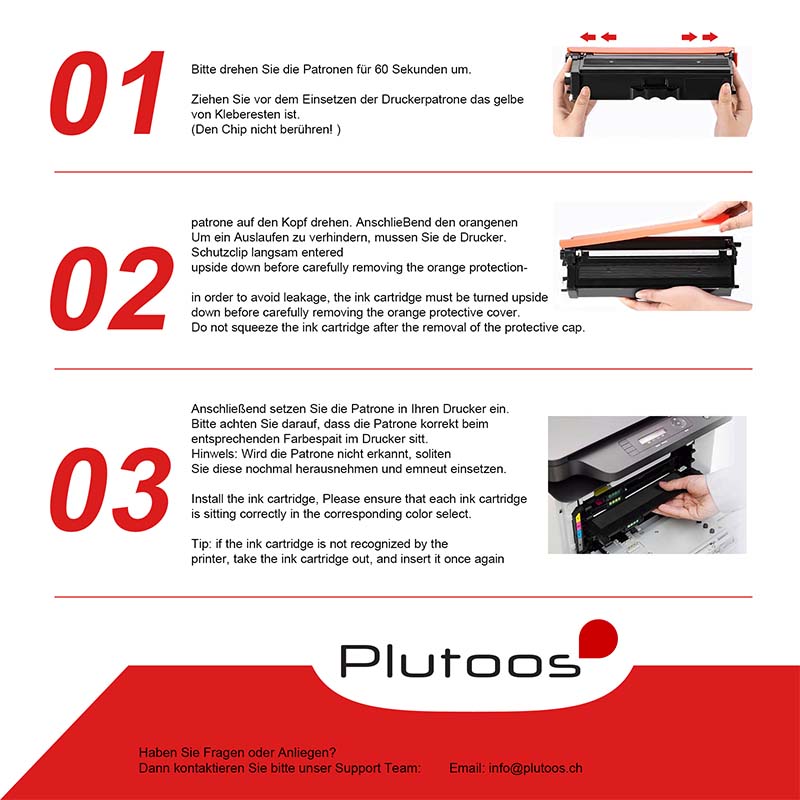
- Gently rock the cartridge 5–6 times horizontally (side to side) to distribute the toner powder evenly.
- Remove the protective seal/strip.
- Insert the cartridge until it clicks into place — the chip is recognized automatically, no resetter needed.
- Confirm the non-genuine cartridge message with OK — this is normal.
- Caution: never touch the green drum roller — fingerprints and scratches cause permanent print defects.
Care & storage
- Store cool, dry and dark — away from direct sunlight and heat sources.
- Never touch the drum surface or expose it to direct light.
- Store the cartridge horizontally, in its original protective bag.
- Once opened, use the cartridge up rather than storing it — opened toner cartridges attract humidity and dust over time.
Good to know
- «Toner low» message: This message often appears early. Remove the cartridge and gently rock it side to side to redistribute the remaining powder — this often yields many more pages.
- Toner vs. drum: Two different consumables. The toner cartridge holds the powder that is used up as you print; the drum unit transfers the image onto the paper and has its own lifespan. Streaks, spots or ghosting usually point to the drum, not the toner.
- Firmware updates: Printer manufacturers occasionally release updates that restrict the recognition of non-original cartridges — as a rule, only the latest firmware versions are able to identify and block compatible cartridges. Many customers and user forums report that those who want to use compatible cartridges improve their chances of trouble-free operation when automatic firmware updates remain switched off in the printer settings. If an update has already been installed and messages such as “Cartridge not compatible” or “Ink level low” appear, other customers report that rolling the firmware back to the previous version has helped — instructions can be found via a Google/YouTube search for your printer model and “firmware downgrade”. We pass on these experiences of other customers in good faith; whether and how you apply them is solely your decision and responsibility — results may vary from printer to printer.
Troubleshooting
| Problem | Solution |
|---|---|
| Cartridge is not recognized | Remove the cartridge, wipe the contacts with a dry cloth, reinsert until it clicks, restart the printer. |
| Streaks or fading print | Remove the cartridge and gently rock it side to side to redistribute the toner; check the remaining drum life in the printer menu. |
| Ghosting / repeating marks | Usually caused by the drum unit, not the toner — check the drum life in the printer menu and replace the drum unit if needed. |
| Message “Cartridge not compatible” / “Ink level low” after a firmware update | Restart the printer, remove the cartridge and reinsert it until it clicks, confirm the message with OK. If the message appears immediately after a firmware update, other customers report that rolling the firmware back to the previous version has helped (Google/YouTube search: printer model + “firmware downgrade”) — the decision and its execution rest solely with the customer. |
Frequently asked questions
❓ Does a compatible cartridge void my printer warranty?
No. Under Swiss and EU law the warranty remains valid unless the cartridge demonstrably caused the defect.
❓ What do the page yields mean?
Page yields are measured according to ISO/IEC 19752 (mono) or ISO/IEC 19798 (color) at 5 % page coverage — roughly a standard business letter. Real-world yield varies: documents with graphics, tables or bold headlines use more toner, so your actual mileage can be lower.
❓ Is the print quality the same as the original?
Yes — toner powder matched to the Brother laser printing technology, produced to ISO 9001 standard.
❓ My printer suddenly reports an error after an update — is the cartridge defective?
No, as a rule it is not. Printer manufacturers occasionally release firmware updates that identify and restrict compatible cartridges — the cartridge itself remains fully functional. Many customers report that rolling the firmware back to the previous version helps (Google/YouTube search: printer model + “firmware downgrade”) and that compatible cartridges work most reliably when automatic updates remain switched off in the printer settings. Whether and how you apply this is solely your decision and responsibility.
❓ How fast is delivery?
Ordered before 5 p.m. and in stock: your order leaves our Swiss warehouse the same working day — delivered mostly the next working day, latest the 2nd. Free shipping across Switzerland and Liechtenstein. Live stock and the expected delivery date are shown at the top next to the add-to-cart button — if out of stock, we deliver as soon as possible, usually within 15 days.
| Farbe: | Yellow |
|---|---|
| Seitenleistung: | 1000 Seiten |
| kompatibel mit: | Brother TN-248XLY |
Similar Items

Content: 2300 Seiten (CHF 2.73 / 100 Seiten)

Content: 9900 Seiten (CHF 1.72 / 100 Seiten)

Content: 2300 Seiten (CHF 2.73 / 100 Seiten)

Content: 3000 Seiten (CHF 2.10 / 100 Seiten)