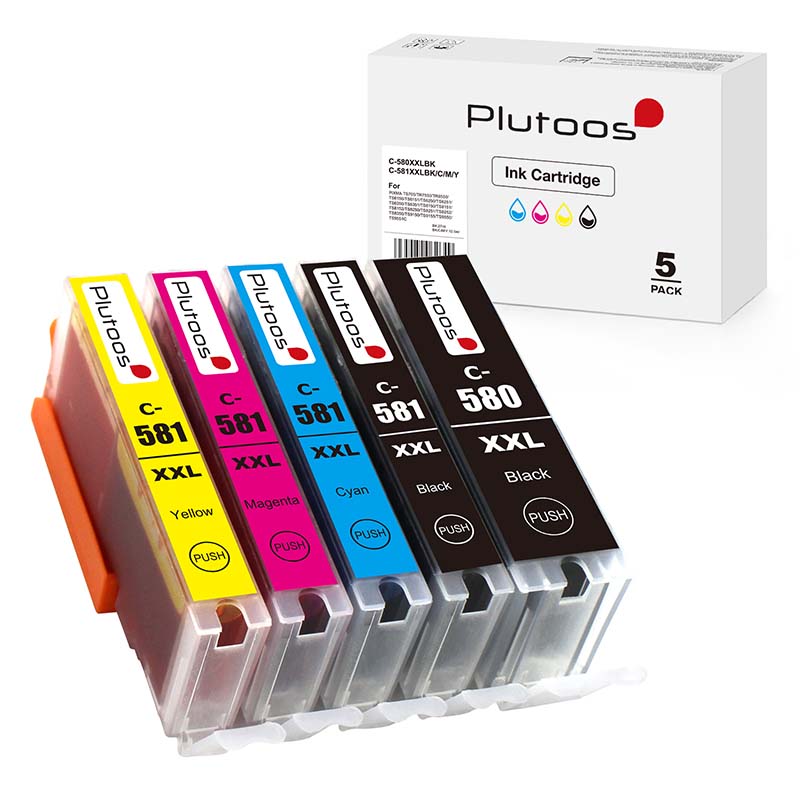
Plutoos CLI-581XXL Yellow Ink Cartridge – compatible with Canon, 12.5 ml for PIXMA TS705, TS705a, TS6150, TS6151, TS6250, TS6251, TS6350, TS6350a


CHF 10.20
Free shipping
Available in 15 days


shipping
delivery*
guarantee
returns
payments
🖨️ Plutoos CLI-581XXL Ink Cartridge Yellow Compatible with Canon CLI-581XXL 1997C001
Colour
| 🎨 Colour | 🇨🇭 Swiss stock |
The Plutoos CLI-581XXL is a compatible yellow ink cartridge for the original Canon CLI-581XXL ink cartridge — a cost-effective alternative for anyone looking to reduce printing costs without compromising on quality. With pigment-based ink, the Plutoos CLI-581XXL delivers sharp text, clean lines and crisp documents — ideal for everyday printing at home, in the home-office, at school or in small offices. Same business-day shipping from Swiss stock with free delivery and next-day arrival when in stock.
The Plutoos CLI-581XXL is engineered specifically for Canon TS9550, TS8350, TR8550, TS6350 — all popular Canon models widely used in Swiss households and small offices. The cartridge handles text documents, school papers, invoices and general office prints with reliable consistency. 28 Canon printer models are confirmed compatible in total — see the full list below.
Compared to the original Canon CLI-581XXL, the Plutoos alternative offers the same print quality at a significantly lower price, with Swiss quality control, fast delivery and a 60-day return policy on unopened items.
Technical data
| Product type | Compatible ink cartridge |
| Colour | Colour |
| Compatible with | Canon PGI-580 / CLI-581 family |
| Printer technology | Canon PGI/CLI |
| EAN | 0647056892946 |
| Printer brand | Canon |
| Print technology | Inkjet |
Compatible printer models
The Plutoos is compatible with a wide range of Canon printers — from home and home-office models such as Canon PIXMA TS705 to professional models like Canon PIXMA TR8550. The full list of confirmed compatible printers:
| ✓ Canon PIXMA TS705 | ✓ Canon PIXMA TS705a | ✓ Canon PIXMA TS6150 |
| ✓ Canon PIXMA TS6151 | ✓ Canon PIXMA TS6250 | ✓ Canon PIXMA TS6251 |
| ✓ Canon PIXMA TS6350 | ✓ Canon PIXMA TS6350a | ✓ Canon PIXMA TS6351 |
| ✓ Canon PIXMA TS6351a | ✓ Canon PIXMA TS8150 | ✓ Canon PIXMA TS8151 |
| ✓ Canon PIXMA TS8152 | ✓ Canon PIXMA TS8250 | ✓ Canon PIXMA TS8251 |
| ✓ Canon PIXMA TS8252 | ✓ Canon PIXMA TS8350 | ✓ Canon PIXMA TS8350a |
| ✓ Canon PIXMA TS8351 | ✓ Canon PIXMA TS8351a | ✓ Canon PIXMA TS8352 |
| ✓ Canon PIXMA TS8352a | ✓ Canon PIXMA TS9150 | ✓ Canon PIXMA TS9155 |
| ✓ Canon PIXMA TS9550 | ✓ Canon PIXMA TS9551C | ✓ Canon PIXMA TR7550 |
| ✓ Canon PIXMA TR8550 |
Package contents
- 1 x Plutoos CLI-581XXL Ink Cartridge, Colour
Installation & first use
- Unpack only right before installing and pull the protective strip.
- Insert until it clicks — the cartridge is recognized automatically, no resetter needed.
- Confirm the “non-genuine cartridge” notice with OK — this is normal.
- Print a nozzle check after installation.
Care & storage
- Store sealed, upright, at 5–35 °C, away from direct sunlight — best used within 24 months.
- Print a few pages at least every 2–3 weeks so the nozzles do not dry out.
- Never leave the printer without a cartridge — the print head can dry out.
- Storing an opened cartridge: seal all open ports with the original protective tape, a tank tape or ordinary scotch tape, cover the contacts, store upright at room temperature.
- (Our advice: once opened, use the cartridge up completely rather than storing it — opened cartridges are very likely to dry out or start leaking.)
- Recycling: Return empty cartridges to us free of charge, drop them at any electronics store (e.g. Media Markt, Fust or Interdiscount) or hand them in at a recycling centre.
Good to know
- “Non-genuine cartridge” message: One-time notice — confirm with OK, printing continues normally. The printer warranty remains valid.
- Firmware updates:Printer manufacturers occasionally release updates that restrict the recognition of non-original cartridges — as a rule, only the latest firmware versions are able to identify and block compatible cartridges. Many customers and user forums report that those who want to use compatible cartridges improve their chances of trouble-free operation when automatic firmware updates remain switched off in the printer settings. If an update has already been installed and messages such as “Cartridge not compatible” or “Ink level low” appear, other customers report that rolling the firmware back to the previous version has helped — instructions can be found via a Google/YouTube search for your printer model and “firmware downgrade”. We pass on these experiences of other customers in good faith; whether and how you apply them is solely your decision and responsibility — results may vary from printer to printer.
- Ink level display: The printer reports ink levels; on some models the display may differ slightly — the actual fill volume is not affected.
Troubleshooting
| Problem | Solution |
|---|---|
| Cartridge not recognized | Remove, wipe the contacts with a dry cloth, reinsert until it clicks, restart the printer. |
| Streaks / faint print | Run 1–2 nozzle cleanings from the printer menu, then a nozzle check. |
| Wrong colors | Run print head alignment from the printer menu. |
| Message “Cartridge not compatible” / “Ink level low” after a firmware update | Restart the printer, remove the cartridge and reinsert it until it clicks, confirm the message with OK. If the message appears immediately after a firmware update, other customers report that rolling the firmware back to the previous version has helped (Google/YouTube search: printer model + “firmware downgrade”) — the decision and its execution rest solely with the customer. |
Frequently asked questions
Is the Plutoos CLI-581XXL compatible with all Canon printers?
Yes. The Plutoos CLI-581XXL is officially compatible with Canon TS9550, TS8350, TR8550, TS6350 and 23 more printer models — see the full list above.
How many pages does a Plutoos CLI-581XXL print?
Page yield matches the original Canon CLI-581XXL under ISO/IEC standard conditions.
Are the Plutoos CLI-581XXL cartridge original Canon or compatible?
These are compatible ink cartridges — a tested, cost-effective alternative to the original Canon CLI-581XXL. Print quality and yield match the original.
How fast is delivery in Switzerland?
Yes, next working day delivery if the item is in stock. The current stock availability and expected delivery date are shown directly near the 'Add to Cart' button at the top of this page. Free shipping for all orders.
Will using the Plutoos CLI-581XXL void my Canon printer warranty?
No. Under EU and Swiss consumer law, the use of compatible ink cartridges cannot void a printer's warranty unless the cartridge is proven to have caused damage to the printer. That said, Plutoos does not assume responsibility for any printer-side issues — the use of compatible cartridges is at the customer's own discretion and responsibility.
| Cartridge Size: | Regulär |
|---|---|
| Cartridge Type: | Tinte |
| Compatible Printer Brand: | Canon |
| Compatible Printer Series: | PIXMA TR, PIXMA TS |
| compatible printer models: | 700 Series, 705, 705a, 6100 Series, 6150, 6151, 6200 Series, 6250, 6251, 6300 Series, 6350, 6350a, 6351, 6351a, 7500, 7550, 7650, 8100 Series, 8150, 8151, 8152, 8200 Series, 8250, 8251, 8252, 8300 Series, 8350, 8350a, 8351, 8351a, 8352, 8352a, 8500, 8550, 9100 Series, 9150, 9151, 9155, 9500 Series, 9550, 9550a, 9551C, 9551CA |
| manufacturer: | Plutoos |
| print color: | Gelb |
Similar Items